Rspamd GPT Plugin をさくらのAI Engine で動かしてみた

Rspamd 3.9以降で標準的な外部AI連携機能(GPT Plugin)が利用可能になりました。
1ヶ月程度使用してみたので久しぶりに何か書いてみます。

環境

サーバ: さくらのVPS
OS: Rocky Linux 9.5
Rspamd: 3.13.0
LLM: さくらのAI Engine

メールサーバは個人ドメインのもので月2500通程度メールが届く
さくらのAIエンジンは月3000リクエストまでは無料のプランがある

設定

/etc/rspamd/local.d/gpt.conf
— ここから —
enabled = true;
type = “openai”;
url = “https://api.ai.sakura.ad.jp/v1/chat/completions”;
api_key = “さくらのAI Engine の アカウントトークン”;
model = “gpt-oss-120b” ;
autolearn = true;
timeout = 10s;
allow_ham = true;
reason_header = “X-GPT-Reason”;
— ここまで —

判定例

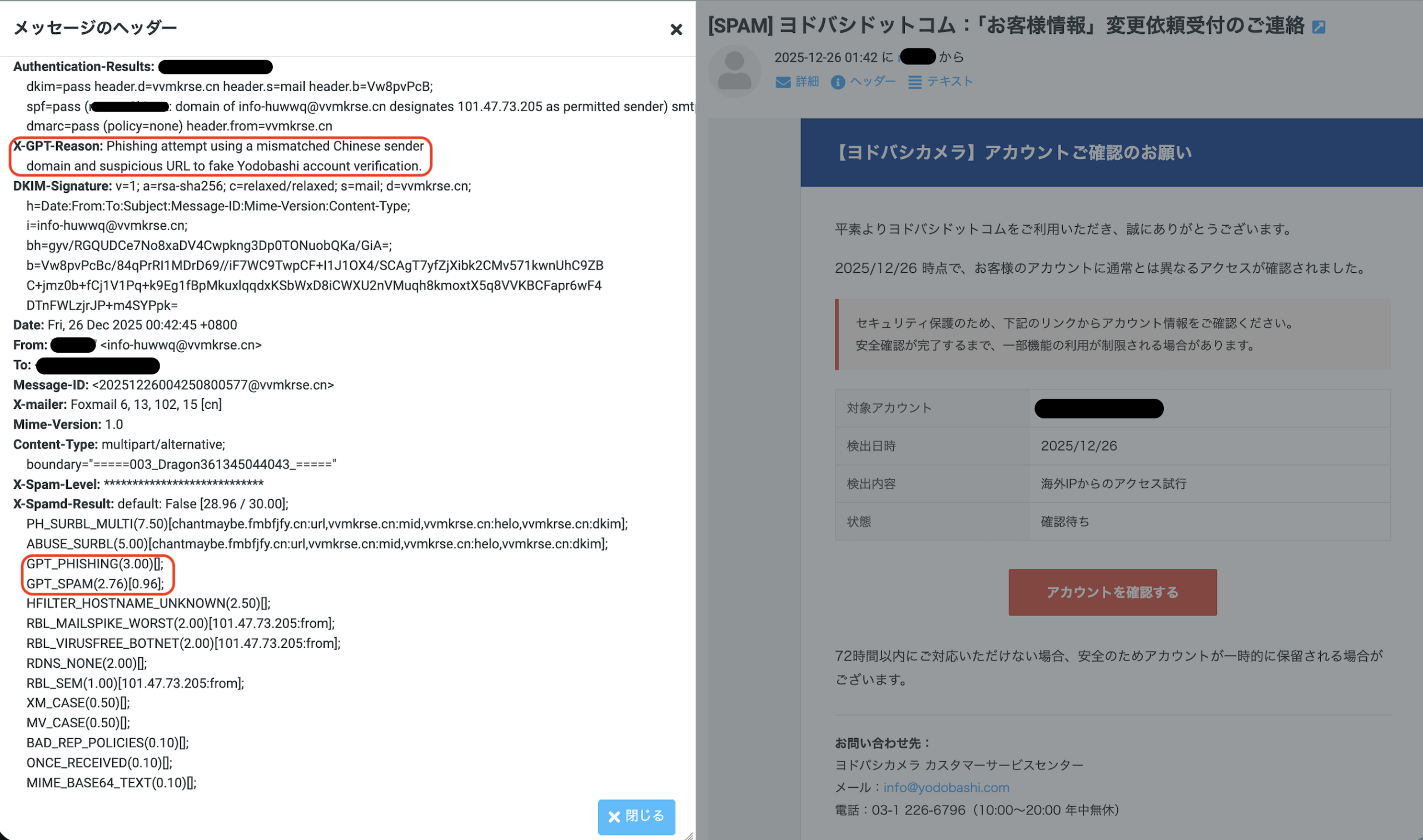
X-GPT-Reason に判定理由
X-Spamd-Result に GPT_PHISHING や GPT_SPAM、GPT_HAMなどが追加される。

結果

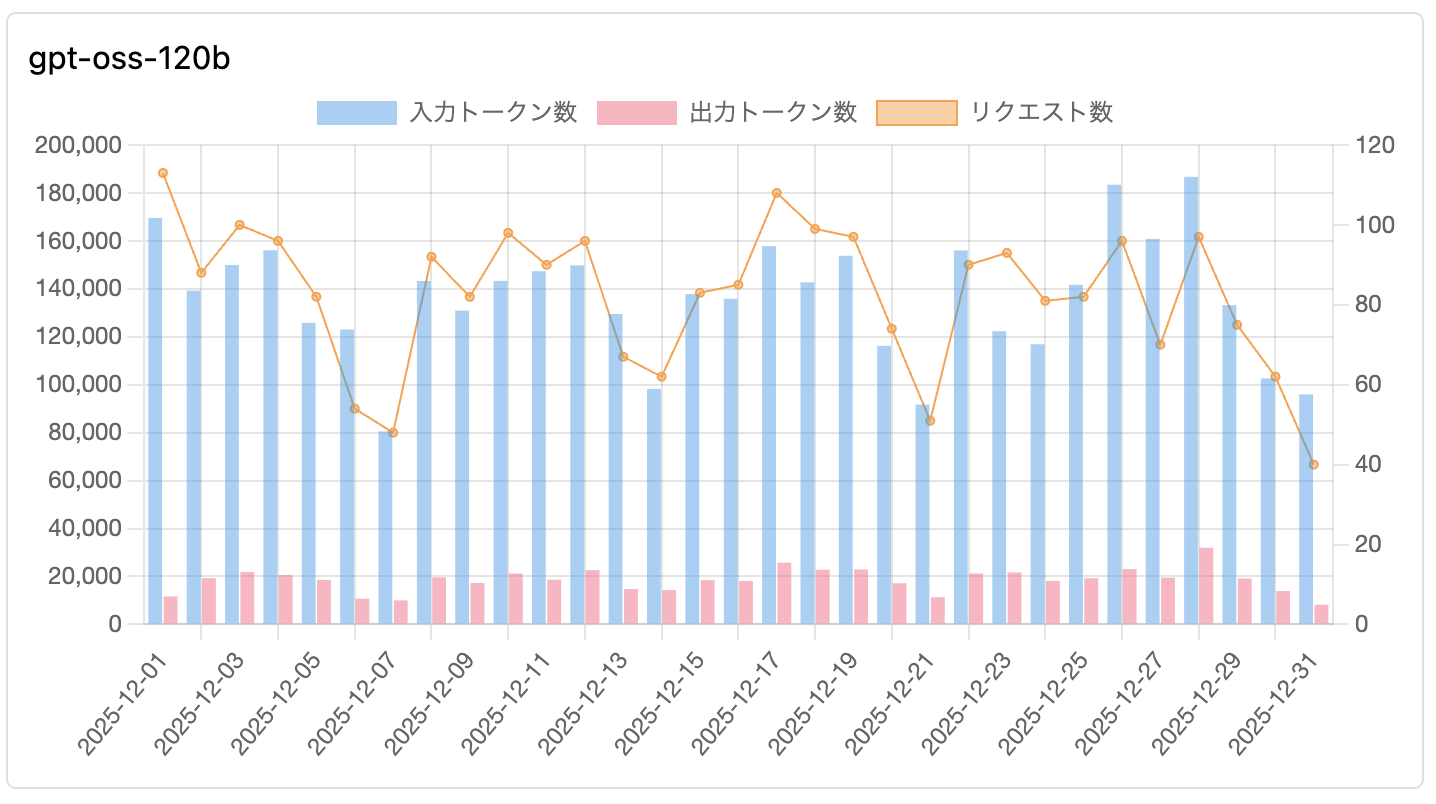
集計対象メール数: 2,485 通
GPTの判定平均時間: 1.66 秒 (最長で3秒程度)


さくらのAI Engine の利用グラフ

1. 【HAM(正常)】判定に多い理由

英文の理由 (Actual Reason) 日本語訳
Legitimate technical mailing list discussion with no suspicious links or requests, indicating ham. 不審なリンクや要求を含まない、正当な技術系メーリングリストの議論であるため、HAM(正常)と判断。
The email is a legitimate automated TLS report from example.com with no suspicious content. example.com からの正当な自動生成TLSレポートであり、不審なコンテンツは含まれていない。
Legitimate job recruitment notification from a known domain (example.com) with matching sender info. 既知のドメイン(example.com)からの正当な求人通知であり、送信者情報も一致している。
Likely ham: a legitimate technical mailing list reply with matching domain and benign URLs. 正常な可能性が高い:ドメインが一致しており、無害なURLを含む正当な技術メーリングリストへの返信である。

2. 【GPT_PHISHING(フィッシング)】判定に多い理由

英文の理由 (Actual Reason) 日本語訳
The email pretends to be from Amazon but originates from an unrelated domain (example.com) and uses suspicious links. Amazonを装っているが、無関係なドメイン(example.com)から送信されており、不審なリンクを使用している。
Suspicious request for account update or login using an external URL (example.com/path) that is not the official domain. 公式ドメインではない外部URL(example.com/path)を使用して、アカウント更新やログインを促す不審な要求。
Uses urgency and suspicious links (example.com) to solicit personal information, typical of phishing scams. フィッシング詐欺に典型的な、緊急性の強調と不審なリンク(example.com)を用いた個人情報の搾取。
Matches credential harvesting patterns by directing to a non-official login page for site administration. サイト管理用の非公式なログインページへ誘導しており、認証情報搾取(クレデンシャル・ハーベスティング)のパターンに一致する。

3. 【GPT_SPAM(スパム)】判定に多い理由

英文の理由 (Actual Reason) 日本語訳
High spam probability due to excessive promotional language, marketing keywords, and unsolicited recruitment. 過度な宣伝文句、マーケティングキーワード、および未承諾の求人勧誘が含まれるため、スパムの可能性が高い。
Primarily promotional content with multiple marketing links and emphasis on discounts or offers. 主にプロモーション内容であり、多数のマーケティング用リンクや、割引・特典の強調が見られる。
Frequent use of marketing phrases and a clear intent to drive traffic to a commercial service. マーケティング用語が頻繁に使用されており、商業サービスへ誘導しようとする明確な意図がある。

GPT_PHISHING がついたもので迷惑メールと判定されたくないものが数通あった。

注意

テストしていたrspamdバージョン(3.13.0)と最新のバージョンでプロンプトが大幅に改善されていることに気づいたので、バージョンアップ(3.14.2)をしてしばらくまた様子をみたい。

rspamd 3.13.0

  settings.prompt = "Analyze this email strictly as a spam detector given the email message, subject, " ..
      "FROM and url domains. Evaluate spam probability (0-1). " ..
      "Output ONLY 3 lines:\n" ..
      "1. Numeric score (0.00-1.00)\n" ..
      "2. One-sentence reason citing whether it is spam, the strongest red flag, or why it is ham\n" ..
      "3. Empty line or mention ONLY the primary concern category if found from the list: " ..
        table.concat(lua_util.keys(categories_map), ', ')

rspamd 3.14.2

  settings.prompt = "Analyze this email as a spam detector. Evaluate spam probability (0-1).\n\n" ..
      "LEGITIMATE patterns to recognize:\n" ..
      "- Verification emails with time-limited codes are NORMAL and legitimate\n" ..
      "- Transactional emails (receipts, confirmations, password resets) from services\n" ..
      "- 'Verify email' or 'confirmation code' is NOT automatically phishing\n" ..
      "- Emails from frequent/known senders (see context) are more trustworthy\n\n" ..
      "Flag as SPAM/PHISHING only with MULTIPLE red flags:\n" ..
      "- Urgent threats or fear tactics (account closure, legal action)\n" ..
      "- Domain impersonation or suspicious lookalikes\n" ..
      "- Requests for passwords, SSN, credit card numbers\n" ..
      "- Mismatched URLs pointing to different domains than sender\n" ..
      "- Poor grammar/spelling in supposedly professional emails\n\n" ..
      "IMPORTANT: If sender is 'frequent' or 'known', reduce phishing probability " ..
      "unless there are strong contradictory signals.\n\n" ..
      "Output ONLY 3 lines:\n" ..
      "1. Numeric score (0.00-1.00)\n" ..
      "2. One-sentence reason citing the strongest indicator\n" ..
      "3. Primary category if applicable: " ..
      table.concat(lua_util.keys(categories_map), ', ')

さくらのクラウドに RockyLinux9 でメールサーバを構築する

さくらのクラウドで自分が利用する構成の単体のメールサーバを構築する手順書兼スタートアップスクリプトを書いた。

https://github.com/ma3ki/startupscripts/tree/master/originalscript/mailsystem_rockylinux9

サーバを作成開始してから20分程度で完成する。

SPF/DKIM/DMARC/ARC に対応、送信StartTLS にも対応し、すぐに Gmailにも送信できちゃう。mta-sts はメールサーバ移行時に忘れててトラブったことがあるので不要と判断した。

さくらのレンタルサーバから転送するメールのSPF認証をpassさせる

さくらのレンタルサーバでメールを転送すると大抵の場合、転送先で SPF認証が fail します。

理由は送信元のメールアドレスを Envelope From に設定したまま転送先にメールを送信する為です。(大抵のレンタルサーバサービスのメール転送はこの仕様です)

さくらのレンタルサーバは メールの転送に maildrop を使用しているため、設定を書き換えることで転送メールの Envelope From を変更することができます。転送メールの SPF認証を pass させたい場合は、Envelope From を さくらのレンタルサーバで使用しているメールアドレスに書き換えればよいです。

 .mailfilter は下記のように書き換えます。

  • $LOGNAME は さくらのレンタルサーバのメールアドレスが保存されている変数
  • FROMは Envelope Fromの変数
  • foobar@example.com は転送先のメールアドレス

FROM="$LOGNAME"
cc "!foobar@example.com"

これで転送先でSPF認証はpassします。

389 Directory Server マルチマスタレプリケーション設定

Rocky Linux 8.4 にて 389 Directory Server のマルチマスタレプリケーション設定を試した手順(※SELinuxは無効にしてます)

#-- 構成
- 1台目(サプライヤー1)のIPアドレス 192.168.1.1
- 2台目(サプライヤー2)のIPアドレス 192.168.1.2

###### 1台目,2台目共通手順 ここから ######
#-- 389portの接続許可
# firewall-cmd --permanent --add-port=389/tcp
# firewall-cmd --reload

#-- 各種設定を変数に代入
# ROOT_DN="cn=Directory Manager"
# ROOT_PASSWORD="RootdnPassword"
# REP_DN="cn=replication manager,cn=config"
# REP_PASSWORD="ReplicaPassword"
# SUPIP1=192.168.1.1
# SUPIP2=192.168.1.2

#-- 389 Directory Serverのインストール
# dnf -y module enable 389-ds
# dnf -y install 389-ds-base openldap-clients

#-- version の確認
# rpm -qa 389-ds-base
389-ds-base-1.4.3.16-19.module+el8.4.0+636+837ee950.x86_64

#-- テンプレート作成
# dscreate create-template ldap.inf

#-- テンプレート編集
# sed -ri -e "s/;(root_password).*/\1=${ROOT_PASSWORD}\nroot_dn=${ROOT_DN}/" ldap.inf

#-- インスタンスを作成 (インスタンス名はデフォルトのlocalhostのまま)
# dscreate from-file ldap.inf
Starting installation...
Completed installation for localhost

#-- インスタンスを起動
# systemctl enable dirsrv@localhost.service
# systemctl start dirsrv@localhost

#-- データベースを作成
# dsconf localhost backend create --suffix="dc=example,dc=com" --be-name="userRoot"
The database was sucessfully created

###### 1台目,2台目共通手順 ここまで ######

###### 2台目のみで実行 ここから ######
#-- レプリケーション用のアカウントを作成(replica-id=2)
# dsconf localhost replication enable --suffix="dc=example,dc=com" --role="master" --replica-id=2 --bind-dn="${REP_DN}" --bind-passwd="${REP_PASSWORD}"
Replication successfully enabled for "dc=example,dc=com"

#-- 389-ds のバージョンが 1.4.4.14以降の場合は role に supplier を使用する
###### 2台目のみで実行 ここまで ######

###### 1台目のみで実行 ここから######
#-- ルートDNのエントリーを作成
# cat <<_EOL_> example_com.ldif
dn: dc=example,dc=com
objectClass: dcObject
objectClass: organization
dc: example
o: example.com

_EOL_

# ldapadd -x -h localhost -D "${ROOT_DN}" -w ${ROOT_PASSWORD} -f example_com.ldif
adding new entry "dc=example,dc=com"

#-- レプリケーション用のアカウントを作成(replica-id=1)
# dsconf localhost replication enable --suffix="dc=example,dc=com" --role="master" --replica-id=1 --bind-dn="${REP_DN}" --bind-passwd="${REP_PASSWORD}"
Replication successfully enabled for "dc=example,dc=com"

#-- レプリカ合意を作成し、サプライヤー2を初期化 (何故かコマンドの応答まで時間がかかる)
# dsconf localhost repl-agmt \
      create --suffix="dc=example,dc=com" --host="${SUPIP2}" --port=389 \
      --conn-protocol=LDAP --bind-dn="${REP_DN}" \
      --bind-passwd="${REP_PASSWORD}" --bind-method=SIMPLE --init \
      agreement-supplier1-to-supplier2
Successfully created replication agreement "agreement-supplier1-to-supplier2"
Agreement initialization started...

#-- ここまでで サプライヤー1 から サプライヤー2 へのデータ更新は同期されるが、
#-- まだ サプライヤー2 から サプライヤー1 へのデータ更新は同期されない

###### 1台目のみで実行 ここまで######

###### 2台目のみで実行 ここから ######
#-- レプリカ合意を作成
# dsconf localhost repl-agmt \
      create --suffix="dc=example,dc=com" --host="${SUPIP1}" --port=389 \
      --conn-protocol=LDAP --bind-dn="${REP_DN}" \
      --bind-passwd="${REP_PASSWORD}" --bind-method=SIMPLE \
      agreement-supplier2-to-supplier1
Successfully created replication agreement "agreement-supplier2-to-supplier1"

#-- これで双方向でデータ更新がされる状態となる

###### 2台目のみで実行 ここまで ######

08.メールサーバ構築 – roundcube編[さくらのクラウド/CentOS8]

15. roundcube のインストール

#-- 必要な情報を変数に設定
# DOMAIN=sacloud.ma3ki.net
# HTTPS_DOCROOT=/var/www/html/https_root
# WORKDIR=/root/mailserver

#-- roundcube 1.4系の最新版を取得
# git clone https://github.com/roundcube/roundcubemail.git ${WORKDIR}/git/roundcubemail
# cd ${WORKDIR}/git/roundcubemail
# base_version=1.4
# version=$(git tag | grep "^${base_version}" | sort --version-sort | tail -1)

# git checkout ${version}
# cp -pr ../roundcubemail ${HTTPS_DOCROOT}/roundcubemail-${version}
# ln -s ${HTTPS_DOCROOT}/roundcubemail-${version} ${HTTPS_DOCROOT}/roundcube

#-- roundcube の DB を作成
# export HOME=/root
# mysql -e "create database roundcubemail character set utf8 collate utf8_bin;"
# mysql -e "create user roundcube@localhost identified by 'roundcube';"
# mysql -e "grant all privileges ON roundcubemail.* TO roundcube@localhost ;"
# mysql -e "flush privileges;"
# mysql roundcubemail < ${HTTPS_DOCROOT}/roundcube/SQL/mysql.initial.sql

#-- 必要なPHPのライブラリをインストール
# dnf install -y php-{pdo,mbstring,intl,gd,mysqlnd,pear-Auth-SASL,zip} php-pear-Net-SMTP
# pear channel-update pear.php.net
# pear install -a Mail_mime
# pear install Net_LDAP
# pear install Net_Sieve-1.4.4

# dnf install -y ImageMagick ImageMagick-devel
# pecl channel-update pecl.php.net
# yes | pecl install Imagick
# echo extension=imagick.so >> /etc/php.d/99-imagick.ini

#-- php-fpm の再起動
# systemctl restart php-fpm

#-- roundcube の設定
# cat <<'_EOL_'> ${HTTPS_DOCROOT}/roundcube/config/config.inc.php
<?php
$config['db_dsnw'] = 'mysql://roundcube:roundcube@localhost/roundcubemail';
$config['default_host'] = array('_DOMAIN_');
$config['default_port'] = 993;
$config['smtp_server'] = '_DOMAIN_';
$config['smtp_port'] = 465;
$config['smtp_user'] = '%u';
$config['smtp_pass'] = '%p';
$config['support_url'] = '';
$config['product_name'] = 'Roundcube Webmail';
$config['des_key'] = 'rcmail-!24ByteDESkey*Str';
$config['plugins'] = array('managesieve', 'password', 'archive', 'zipdownload');
$config['managesieve_host'] = 'localhost';
$config['spellcheck_engine'] = 'pspell';
$config['skin'] = 'elastic';
_EOL_

# sed -i "s#_DOMAIN_#ssl://${DOMAIN}#" ${HTTPS_DOCROOT}/roundcube/config/config.inc.php

#-- plugin の設定
# cp -p ${HTTPS_DOCROOT}/roundcube/plugins/managesieve/config.inc.php{.dist,}
# sed -i -e "s/managesieve_vacation'] = 0/managesieve_vacation'] = 1/" ${HTTPS_DOCROOT}/roundcube/plugins/managesieve/config.inc.php
# cp -p ${HTTPS_DOCROOT}/roundcube/plugins/password/config.inc.php{.dist,}
# sed -i -e "s/'sql'/'ldap'/" \
  -e "s/'ou=people,dc=example,dc=com'/''/" \
  -e "s/'dc=exemple,dc=com'/''/" \
  -e "s/'uid=%login,ou=people,dc=exemple,dc=com'/'uid=%name,ou=People,%dc'/" \
  -e "s/'(uid=%login)'/'(uid=%name,ou=People,%dc)'/" ${HTTPS_DOCROOT}/roundcube/plugins/password/config.inc.php

# chown -R nginx. ${HTTPS_DOCROOT}/roundcubemail-${version}
# cd ${HTTPS_DOCROOT}/roundcube
# php -r "copy('https://getcomposer.org/installer', 'composer-setup.php');"
# php composer-setup.php
# php -r "unlink('composer-setup.php');"
# sed -e 's/suggest/require/' -e 's/ required .*/"/' composer.json-dist | perl -ne '{if(/net_ldap3/){chomp; print "$_,\n";}else{print;}}' > composer.json
# yes | php composer.phar install --no-dev
# bin/install-jsdeps.sh
# mv ${HTTPS_DOCROOT}/roundcube/installer ${HTTPS_DOCROOT}/roundcube/_installer

#-- elastic テーマを使用するため、less コマンドをインストール
# dnf install -y npm
#-- less 4.0.0 だと問題が発生する為、3.13.1 を指定してインストール
# npm install -g less@3.13.1

# cd ${HTTPS_DOCROOT}/roundcube/skins/elastic
# lessc -x styles/styles.less > styles/styles.css
# lessc -x styles/print.less > styles/print.css
# lessc -x styles/embed.less > styles/embed.css

#-- nginx 用設定ファイル作成
# cat <<'_EOL_' > /etc/nginx/conf.d/https.d/roundcube.conf
  location ^~ /roundcube {
    location ~ \.php$ {
      try_files $uri =404;
      fastcgi_pass unix:/run/php-fpm/www.sock;
      fastcgi_index index.php;
      fastcgi_param SCRIPT_FILENAME $document_root/$fastcgi_script_name;
      include fastcgi_params;
    }
    location ~ ^/roundcube/(README|INSTALL|LICENSE|CHANGELOG|UPGRADING)$ {
      deny all;
    }

    location ~ ^/roundcube/(bin|SQL)/ {
      deny all;
    }

    # A long browser cache lifetime can speed up repeat visits to your page
    location ~* ^/roundcube/.*\.(jpg|jpeg|gif|png|webp|svg|woff|woff2|ttf|css|js|ico|xml)$ {
      access_log        off;
      log_not_found     off;
      expires           360d;
    }
  }
_EOL_

#-- nginx 再起動
# systemctl restart nginx

07.メールサーバ構築 – mysql編[さくらのクラウド/CentOS8]

13. mysql のインストール

#-- 必要な情報を変数に設定
# DOMAIN=sacloud.ma3ki.net
# HTTPS_DOCROOT=/var/www/html/https_root
# ROOT_PASSWORD=HogeHoge
# WORKDIR=/root/mailserver

#-- mysql のインストール
# dnf -y install mysql-{server,devel}

#-- mysqld の起動
# systemctl enable mysqld
# systemctl start mysqld

# (mysqld --initialize-insecure || true)
# mysqladmin -u root password "${ROOT_PASSWORD}"

# cat <<_EOL_> /root/.my.cnf
[client]
host     = localhost
user     = root
password = "${ROOT_PASSWORD}"
socket   = /var/lib/mysql/mysql.sock
_EOL_

#-- validate_passwordのコンポーネントをインストール
# mysql --user=root --password=${ROOT_PASSWORD} -e "INSTALL COMPONENT 'file://component_validate_password';"

# cat <<_EOL_>> /etc/my.cnf.d/mysql-server.cnf

default_authentication_plugin=mysql_native_password
default_password_lifetime=0
validate_password.length=4
validate_password.mixed_case_count=0
validate_password.number_count=0
validate_password.special_char_count=0
validate_password.policy=LOW
_EOL_

#-- mysql 再起動
# systemctl restart mysqld

14. phpldapadmin のインストール

#-- phpldapadmin本家は php7.x に対応していない為、 fork されて対応した下記を clone
# mkdir -p ${WORKDIR}/git
# git clone https://github.com/breisig/phpLDAPadmin.git ${WORKDIR}/git/phpldapadmin

# cp -pr ${WORKDIR}/git/phpldapadmin ${HTTPS_DOCROOT}/phpldapadmin
# cp -p ${HTTPS_DOCROOT}/phpldapadmin/config/config.php{.example,}
# chown -R nginx. ${HTTPS_DOCROOT}/phpldapadmin

#-- basedn を config.php へ設定
# tmpdc=""
# ARRAY_LIST=$(for dc in $(echo "${DOMAIN}" | sed 's/\./ /g')
  do
    tmpdc="${tmpdc}dc=${dc},"
  done
  dc=$(echo ${tmpdc} | sed -e 's/,$//' -e "s/^/'/" -e "s/$/'/")
  printf "${dc}," | sed 's/,$//')

# sed -i -e "301i \$servers->setValue('server','base',array(${ARRAY_LIST}));" ${HTTPS_DOCROOT}/phpldapadmin/config/config.php

#-- 使用しないテンプレートを移動
# mkdir ${HTTPS_DOCROOT}/phpldapadmin/templates/creation_backup
# for x in courierMailAccount.xml courierMailAlias.xml mozillaOrgPerson.xml sambaDomain.xml sambaGroupMapping.xml sambaMachine.xml sambaSamAccount.xml dNSDomain.xml
do
  mv ${HTTPS_DOCROOT}/phpldapadmin/templates/creation/${x} ${HTTPS_DOCROOT}/phpldapadmin/templates/creation_backup
done

次の投稿では roundcube をセットアップします。

06.メールサーバ構築 – nginx編[さくらのクラウド/CentOS8]

10. nginx のインストール

#-- 必要な情報を変数に設定
# DOMAIN=sacloud.ma3ki.net
# HTTP_DOCROOT=/var/www/html/http_root
# HTTPS_DOCROOT=/var/www/html/https_root
# source /etc/sysconfig/network-scripts/ifcfg-eth0

#-- nginx と php-fpm のインストール
# dnf install -y nginx php php-{fpm,ldap,devel,xml,pear,json}

#-- php, php-fpm の設定
# cp -p /etc/php.ini{,.org}
# sed -i -e "s/^max_execution_time = 30/max_execution_time = 300/" \
       -e "s/^max_input_time = 60/max_input_time = 300/" \
       -e "s/^post_max_size = 8M/post_max_size = 20M/" \
       -e "s/^upload_max_filesize = 2M/upload_max_filesize = 20M/" \
       -e "s/^;date.timezone =/date.timezone = 'Asia\/Tokyo'/" /etc/php.ini

# cp -p /etc/php-fpm.d/www.conf{,.org}
# sed -i -e "s/user = apache/user = nginx/" -e "s/group = apache/group = nginx/" /etc/php-fpm.d/www.conf

#-- phpldapadminの10000ユーザ対応
# sed -i -e 's/^;php_admin_value\[memory_limit\] = 128M/php_admin_value\[memory_limit\] = 256M/' /etc/php-fpm.d/www.conf

# chown nginx /var/log/php-fpm
# chgrp nginx /var/lib/php/*

#-- php を update すると、permission が apache に戻るので、その対策
# cat <<_EOL_>> /etc/cron.d/sacloud
* * * * * root chown nginx /var/log/php-fpm >/dev/null 2>&1
* * * * * root chgrp nginx /var/lib/php/{opcache,session,wsdlcache} >/dev/null 2>&1
_EOL_

#-- nginx mail proxy の設定
# cat <<_EOL_> /etc/nginx/mail.conf
mail {
  auth_http  127.0.0.1/nginx_mail_proxy/ldap_authentication.php ;
  proxy on;
  proxy_pass_error_message on;
  include /etc/nginx/default.d/${DOMAIN}_ssl.conf;
  ssl_session_cache shared:MAIL:10m;
  smtp_capabilities PIPELINING 8BITMIME "SIZE 20480000";
  pop3_capabilities TOP USER UIDL;
  imap_capabilities IMAP4rev1;
  smtp_auth login plain;

  server {
    listen     ${IPADDR}:587;
    protocol   smtp;
    starttls   on;
    xclient    on;
    resolver   8.8.8.8 8.8.4.4;
    auth_http_header PORT 587;
  }
  server {
    listen     ${IPADDR}:465;
    protocol   smtp;
    ssl        on;
    xclient    on;
    resolver   8.8.8.8 8.8.4.4;
    auth_http_header PORT 465;
  }
  server {
    listen     ${IPADDR}:995;
    protocol   pop3;
    ssl        on;
    auth_http_header PORT 995;
  }
  server {
    listen     ${IPADDR}:993;
    protocol   imap;
    ssl        on;
    auth_http_header PORT 993;
  }
}
_EOL_

#-- nginx の設定
# cp -p /etc/nginx/nginx.conf{,.org}

# cat <<'_EOL_'> /etc/nginx/nginx.conf
user nginx;
worker_processes auto;
error_log /var/log/nginx/error.log warn;
pid /var/run/nginx.pid;

# Load dynamic modules. See /usr/share/nginx/README.dynamic.
include /usr/share/nginx/modules/*.conf;

events {
    worker_connections  1024;
}

http {
    log_format  main  '$remote_addr - $remote_user [$time_local] "$request" '
                      '$status $body_bytes_sent "$http_referer" '
                      '"$http_user_agent" "$http_x_forwarded_for"';

    access_log  /var/log/nginx/access.log  main;

    sendfile            on;
    tcp_nopush          on;
    tcp_nodelay         on;
    keepalive_timeout   65;
    types_hash_max_size 2048;

    include       /etc/nginx/mime.types;
    default_type  application/octet-stream;

    include /etc/nginx/conf.d/*.conf;
}
include /etc/nginx/mail.conf;
_EOL_

# cat <<_EOL_> /etc/nginx/default.d/${DOMAIN}_ssl.conf
ssl_protocols TLSv1.2 TLSv1.3 ;
ssl_ciphers EECDH+AESGCM;
ssl_ecdh_curve prime256v1;
ssl_prefer_server_ciphers on;
ssl_session_timeout  5m;
ssl_certificate /etc/letsencrypt/live/${DOMAIN}/fullchain.pem;
ssl_certificate_key /etc/letsencrypt/live/${DOMAIN}/privkey.pem;
ssl_trusted_certificate /etc/letsencrypt/live/${DOMAIN}/chain.pem;
resolver 8.8.8.8 8.8.4.4 valid=300s;
resolver_timeout 10s;
_EOL_

# cat <<_EOL_> /etc/nginx/conf.d/http.conf
server {
  listen ${IPADDR}:80;
  server_name _;
  return 301 https://$host$request_uri;
}

server {
  listen 127.0.0.1:80;
  server_name _;
  index index.html, index.php;
  access_log /var/log/nginx/access_auth.log main;
  error_log  /var/log/nginx/error_auth.log  error;
  root ${HTTP_DOCROOT};
  server_tokens off;
  charset     utf-8;

  location ~ \.php\$ {
    allow 127.0.0.1;
    fastcgi_pass unix:/run/php-fpm/www.sock;
    fastcgi_index index.php;
    fastcgi_param SCRIPT_FILENAME \$document_root\$fastcgi_script_name;
    include fastcgi_params;
    deny all;
  }

  error_page 404 /404.html;
    location = /404.html {
  }
  error_page 500 502 503 504 /50x.html;
    location = /50x.html {
  }
}
_EOL_

# mkdir -p ${HTTP_DOCROOT} ${HTTPS_DOCROOT} /var/log/nginx /var/cache/nginx/client_temp /etc/nginx/conf.d/https.d
# cp -p /usr/share/nginx/html/[45]*.html /usr/share/nginx/html/*.png ${HTTP_DOCROOT}
# cp -p /usr/share/nginx/html/[45]*.html /usr/share/nginx/html/*.png ${HTTPS_DOCROOT}
# chown -R nginx. /var/www/html/ /var/log/nginx /var/cache/nginx/client_temp

# cat <<_EOL_> /etc/nginx/conf.d/https.conf
server {
  listen 443 ssl http2 default_server;
  server_name ${DOMAIN};
  include /etc/nginx/default.d/${DOMAIN}_ssl.conf;
  index index.html, index.php;
  access_log /var/log/nginx/access_ssl.log main;
  error_log  /var/log/nginx/error_ssl.log  error;
  root ${HTTPS_DOCROOT};
  server_tokens off;
  charset     utf-8;

  ssl_session_cache shared:WEB:10m;
  add_header Strict-Transport-Security "max-age=31536000; includeSubDomains" always;
  ssl_stapling on ;
  ssl_stapling_verify on ;

  include /etc/nginx/conf.d/https.d/*.conf;

  location ~ \.php\$ {
    fastcgi_pass unix:/run/php-fpm/www.sock;
    fastcgi_index index.php;
    fastcgi_param SCRIPT_FILENAME \$document_root/\$fastcgi_script_name;
    include fastcgi_params;
  }

  error_page 404 /404.html;
    location = /404.html {
  }
  error_page 500 502 503 504 /50x.html;
    location = /50x.html {
  }

}
_EOL_


#-- mta-sts へ対応
mkdir -p ${HTTPS_DOCROOT}/.well-known
cat <<_EOL_> ${HTTPS_DOCROOT}/.well-known/mta-sts.txt
version: STSv1
mx: ${DOMAIN}
mode: enforce
max_age: 10368000
_EOL_

#-- nginx-mail-proxy用の認証スクリプト設置先の作成と必要なモジュールのインストール
# mkdir -p ${HTTP_DOCROOT}/nginx_mail_proxy
# echo "no" | pecl install redis
# echo extension=redis.so  >> /etc/php.d/99-redis.ini

#-- nginx, php-fpm の起動
# systemctl enable nginx php-fpm
# systemctl start nginx php-fpm

#-- OS再起動時にnginxの起動に失敗することがあるので、その対応
# sed -i -e "s/^\(After=network.target remote-fs.target nss-lookup.target\)/\1 network-online.target\nWants=network-online.target/" /usr/lib/systemd/system/nginx.service
# systemctl daemon-reload

#-- firewall の設定
# firewall-cmd --permanent --add-port={25,587,465,993,995,80,443}/tcp
# firewall-cmd --reload

11. nginx-mail-proxy用の認証スクリプト作成

# cd ${HTTP_DOCROOT}/nginx_mail_proxy
# cat <<'_EOL_'>> ldap_authentication.php
<?php
error_reporting(0);

// write syslog
function _writelog($message) {
  openlog("nginx-mail-proxy", LOG_PID, LOG_MAIL);
  syslog(LOG_INFO, "$message");
  closelog();
}

// ldap authentication
function _ldapauth($server,$port,$dn,$passwd) {
  $conn = ldap_connect($server, $port);
  if ($conn) {
    ldap_set_option($conn, LDAP_OPT_PROTOCOL_VERSION, 3);
    $bind = ldap_bind($conn, $dn, $passwd);
    if ($bind) {
      ldap_close($conn);
      return true;
    } else {
      ldap_close($conn);
      return false;
    }
  } else {
    return false;
  }
}

function _mail_proxy($server,$port,$base,$filter,$attribute,$proxyport) {
  $message = "" ;
  $proxyhost = _ldapsearch($server, $port, $base, $filter, $attribute);

  if ($proxyhost === '' ) {
    // proxyhost is not found
    $message = "proxy=failure" ;
    header('Content-type: text/html');
    header('Auth-Status: Invalid login');
  } else {
    // proxyhost is found
    $proxyip = gethostbyname($proxyhost);

    $message = sprintf('proxy=%s:%s', $proxyhost, $proxyport);
    header('Content-type: text/html');
    header('Auth-Status: OK');
    header("Auth-Server: $proxyip");
    header("Auth-Port: $proxyport");
  }
  return $message ;
}

// ldap search
function _ldapsearch($server,$port,$base,$filter,$attribute) {
  $conn = ldap_connect($server, $port);
  if ($conn) {
    ldap_set_option($conn, LDAP_OPT_PROTOCOL_VERSION, 3);
    $sresult = ldap_search($conn, $base, $filter, array($attribute));
    $info = ldap_get_entries($conn, $sresult);
    if ($info[0][$attribute][0] != "" ) {
      return $info[0][$attribute][0];
    }
  }
  return "" ;
}

// set $env from nginx
$env['meth']    = getenv('HTTP_AUTH_METHOD');
$env['user']    = getenv('HTTP_AUTH_USER');
$env['passwd']  = getenv('HTTP_AUTH_PASS');
$env['salt']    = getenv('HTTP_AUTH_SALT');
$env['proto']   = getenv('HTTP_AUTH_PROTOCOL');
$env['attempt'] = getenv('HTTP_AUTH_LOGIN_ATTEMPT');
$env['client']  = getenv('HTTP_CLIENT_IP');
$env['host']    = getenv('HTTP_CLIENT_HOST');
$env['port']    = getenv('HTTP_PORT');

$log = "" ;

// protocol port map
$portmap = array(
  "smtp" => 25,
  "pop3" => 110,
  "imap" => 143,
);

// port searvice name map
$protomap = array(
  "995" => "pops",
  "993" => "imaps",
  "110" => "pop",
  "143" => "imap",
  "587" => "smtp",
  "465" => "smtps",
);

// ldap setting  // atribuite は全て小文字で記述すること
$ldap = array(
    "host" => "127.0.0.1",
    "port" => 389,
    "basedn" => "",
    "filter" => "(mailRoutingAddress=" . $env['user'] . ")",
    "attribute" => "mailmessagestore",
    "dn" => "",
    "passwd" => "",
);

// split uid and domain
$spmra = preg_split('/\@/', $env['user']);

// make dn
foreach (preg_split("/\./", $spmra[1]) as $value) {
    $ldap['dn'] = $ldap['dn'] . 'dc=' . $value . ',' ;
}
$tmpdn = preg_split('/,$/',$ldap['dn']);
$ldap['basedn'] = $tmpdn[0];
$ldap['dn'] = 'uid=' . $spmra[0] . ',ou=People,' . $tmpdn[0];

// set search attribute
if ($env['proto'] === 'smtp' ) {
  $ldap['attribute'] = 'mailhost' ;
}

// set log
$log = sprintf('meth=%s, user=%s, client=%s, proto=%s', $env['meth'], $env['user'], $env['client'], $protomap[$env['port']]);

// set password
$ldap['passwd'] = urldecode($env['passwd']);

// set ratelimit
$max_failcnt = 3 ;
$max_rejectcnt = 3 ;
$expire_time = 120 ;
$reject_time = 600 ;
$max_reject_time = 86400 ;

$whitelist = [
  "127.0.0.1",
  "#IPV4"
];

// check whitelist
if ( ! preg_grep("/^$clientip$/", $whitelist) ) {
  $redis = new Redis();
  try {
    $redis->connect('127.0.0.1', 6379);

    $key = $protomap[$env['port']] . ":" . $env['client'] ;
    $clientip = $env['client'] ;
    $failcnt = $redis->Get($key);
    $ttl = $redis->ttl($key);
    $rejectcnt = $redis->hGet('blacklist', $key);

    if ($failcnt >= $max_failcnt && $ttl > 0 ) {
      // $log = sprintf('auth=reject, %s, failcnt=%s, rejectcnt=%s, ttl=%s',$log,$failcnt,$rejectcnt,$ttl);
      $log = sprintf('auth=reject, %s, passwd=%s, failcnt=%s, rejectcnt=%s, ttl=%s',$log,$ldap['passwd'],$failcnt,$rejectcnt,$ttl);
      header('Content-type: text/html');
      header('Auth-Status: Invalid login');
      _writelog($log);
      exit;
    }
  }
  catch(Exception $e) {
  }
  $redis->close();
}

// ldap authentication
if (_ldapauth($ldap['host'], $ldap['port'], $ldap['dn'], $ldap['passwd'])) {
  // authentication successful
  $log = sprintf('auth=successful, %s', $log);
  $proxyport = $portmap[$env['proto']];
  $result = _mail_proxy($ldap['host'], $ldap['port'], $ldap['basedn'], $ldap['filter'], $ldap['attribute'], $proxyport);
  $log = sprintf('%s, %s', $log, $result);
} else {
  // authentication failure
  // $log = sprintf('auth=failure, %s', $log);
  $log = sprintf('auth=failure, %s, passwd=%s', $log, $ldap['passwd']);

  // check whitelist
  if ( ! preg_grep("/^$clientip$/", $whitelist) ) {
    // set failcnt to redis
    $redis = new Redis();
    try {
      $redis->connect('127.0.0.1', 6379);

      $key = $protomap[$env['port']] . ":" . $env['client'] ;
      $ttl = $redis->ttl($key);
      $failcnt = $redis->Get($key) + 1;
      $rejectcnt = $redis->hGet('blacklist', $key);

      if ( $failcnt > $max_failcnt ) {
        $failcnt = 1 ;
      }

      if ( $failcnt < $max_failcnt ) {
        $redis->Set($key,$failcnt,$expire_time + $ttl);
        if ( empty($rejectcnt) ) {
          $rejectcnt = 0;
          $redis->hSet('blacklist', $key, $rejectcnt);
        }
      } else {
        $rejectcnt += 1;
        $redis->hSet('blacklist', $key, $rejectcnt);
        if ( $rejectcnt >= $max_rejectcnt ) {
          $reject_time = $max_reject_time ;
          $redis->hSet('blacklist', $key, 0);
        }
        $redis->Set($key, $failcnt, $reject_time);
      }

      $ttl = $redis->ttl($key);
      $log = sprintf('%s, failcnt=%s, rejectcnt=%s, ttl=%s',$log,$failcnt,$rejectcnt,$ttl);

    }
    catch(Exception $e) {
    }
    $redis->close();
  }
  header('Content-type: text/html');
  header('Auth-Status: Invalid login');
}

_writelog($log);
exit;
?>
_EOL_

# sed -i "s/#IPV4/${IPADDR}/" ${HTTP_DOCROOT}/nginx_mail_proxy/ldap_authentication.php

これでメールの送受信ができるようになりました。

12. Thunderbird 用の autoconfig を作成

#-- thunderbird 用 autoconfig を作成
# mkdir -p ${HTTPS_DOCROOT}/.well-known/autoconfig/mail
# chown -R nginx. ${HTTPS_DOCROOT}/.well-known

# cat <<'_EOL_'>${HTTPS_DOCROOT}/.well-known/autoconfig/mail/config-v1.1.xml
<?xml version="1.0"?>
<clientConfig version="1.1">
    <emailProvider id="sakuravps">
      <domain>_DOMAIN_</domain>
      <displayName>_DOMAIN_</displayName>
      <displayShortName>_DOMAIN_</displayShortName>
      <incomingServer type="imap">
         <username>%EMAILADDRESS%</username>
         <hostname>_DOMAIN_</hostname>
         <port>993</port>
         <socketType>SSL</socketType>
         <authentication>password-cleartext</authentication>
      </incomingServer>
      <incomingServer type="pop3">
         <username>%EMAILADDRESS%</username>
         <hostname>_DOMAIN_</hostname>
         <port>995</port>
         <socketType>SSL</socketType>
         <authentication>password-cleartext</authentication>
         <pop3>
            <leaveMessagesOnServer>true</leaveMessagesOnServer>
            <downloadOnBiff>true</downloadOnBiff>
            <daysToLeaveMessagesOnServer>14</daysToLeaveMessagesOnServer>
         </pop3>
      </incomingServer>
      <outgoingServer type="smtp">
         <username>%EMAILADDRESS%</username>
         <hostname>_DOMAIN_</hostname>
         <port>465</port>
         <socketType>SSL</socketType>
         <authentication>password-cleartext</authentication>
      </outgoingServer>
    </emailProvider>
    <clientConfigUpdate url="https://_DOMAIN_/.well-known/autoconfig/mail/config-v1.1.xml" />
</clientConfig>
_EOL_

# sed -i "s/_DOMAIN_/${DOMAIN}/g" ${HTTPS_DOCROOT}/.well-known/autoconfig/mail/config-v1.1.xml

次の投稿では mysql と phpldapadmin をセットアップします。
05.メールサーバ構築 – postfix編[さくらのクラウド/CentOS8]

9. postfix のインストール

#-- 必要な情報を変数に設定
# DOMAIN=sacloud.ma3ki.net
# source /etc/sysconfig/network-scripts/ifcfg-eth0

#-- 必要なパッケージのインストール
# dnf install -y postfix {pcre,libdb,libnsl2,mysql,openssl}-devel

#-- dnfでインストールできる postfix は systemd のユニットファイルが欲しかっただけなのでアンインストール
# grep -v ExecStartPre= /usr/lib/systemd/system/postfix.service > /var/tmp/postfix.service
# dnf remove -y postfix

#-- dnfでインストールした postfix は ldap が使用できないため、最新バージョン(3.5.8)のソースから build する
# mkdir -p /root/mailserver/postfix
# cd /root/mailserver/postfix
# VERSION=3.5.8
# curl -O http://mirror.postfix.jp/postfix-release/official/postfix-${VERSION}.tar.gz
# tar xvzf postfix-${VERSION}.tar.gz && cd postfix-${VERSION}

# CCARGS="-Wmissing-prototypes -Wformat -Wno-comment -fPIC \
-DHAS_LDAP -DLDAP_DEPRECATED=1 -DHAS_PCRE -I/usr/include/pcre \
-DHAS_MYSQL -I/usr/include/mysql -DUSE_SASL_AUTH -DUSE_CYRUS_SASL \
-I/usr/include/sasl -DUSE_TLS -DDEF_CONFIG_DIR=\\\"/etc/postfix\\\""

# AUXLIBS="-lldap -llber -lpcre -ldb -lnsl -lresolv -L/usr/lib64/mysql -lmysqlclient \
-lm -L/usr/lib64/sasl2 -lsasl2 -lssl -lcrypto  -pie -Wl,-z,relro,-z,now"

#-- build
# make -f Makefile.init makefiles CCARGS="${CCARGS}" AUXLIBS="${AUXLIBS}"
# make
# make upgrade

#-- systemdのユニットファイルの設置と修正
# mv /var/tmp/postfix.service /usr/lib/systemd/system/
# sed -i -e "s/^\(After=syslog.target network.target\)/\1 network-online.target\nWants=network-online.target/" /usr/lib/systemd/system/postfix.service
# systemctl daemon-reload

#-- postfix の設定

#-- postmulti の有効化
# postmulti -e init
# postmulti -I postfix-inbound -e create

#-- outbound用のpostfix固有設定
# postconf -c /etc/postfix -e inet_interfaces=127.0.0.1
# postconf -c /etc/postfix -e smtpd_milters=inet:127.0.0.1:11332
# postconf -c /etc/postfix -e non_smtpd_milters=inet:127.0.0.1:11332
# postconf -c /etc/postfix -e smtpd_authorized_xclient_hosts=127.0.0.1
# postconf -c /etc/postfix -e smtpd_sasl_auth_enable=yes
# postconf -c /etc/postfix -e smtpd_sender_restrictions=reject_sender_login_mismatch
# postconf -c /etc/postfix -e smtpd_sender_login_maps="ldap:/etc/postfix/ldapsendercheck.cf"

#-- inbound用のpostfix固有設定
# postconf -c /etc/postfix-inbound -X master_service_disable
# postconf -c /etc/postfix-inbound -e inet_interfaces=${IPADDR}
# postconf -c /etc/postfix-inbound -e myhostname=${DOMAIN}
# postconf -c /etc/postfix-inbound -e recipient_delimiter=+
# postconf -c /etc/postfix-inbound -e smtpd_milters=inet:127.0.0.1:11332
# postconf -c /etc/postfix-inbound -e smtpd_helo_restrictions="reject_invalid_hostname reject_non_fqdn_hostname reject_unknown_hostname"
# postconf -c /etc/postfix-inbound -e smtpd_sender_restrictions="reject_non_fqdn_sender reject_unknown_sender_domain"
# postconf -c /etc/postfix-inbound -e relay_domains=/etc/postfix-inbound/relay_domains
# postconf -c /etc/postfix-inbound -e authorized_submit_users=static:anyone
# postconf -c /etc/postfix-inbound -e smtpd_tls_CAfile=/etc/pki/tls/certs/ca-bundle.crt
# postconf -c /etc/postfix-inbound -e smtpd_tls_ask_ccert=yes
# postconf -c /etc/postfix-inbound -e smtpd_tls_cert_file=/etc/letsencrypt/live/${DOMAIN}/fullchain.pem
# postconf -c /etc/postfix-inbound -e smtpd_tls_key_file=/etc/letsencrypt/live/${DOMAIN}/privkey.pem
# postconf -c /etc/postfix-inbound -e smtpd_tls_ciphers=high
# postconf -c /etc/postfix-inbound -e smtpd_tls_loglevel=1
# postconf -c /etc/postfix-inbound -e smtpd_tls_mandatory_ciphers=high
# postconf -c /etc/postfix-inbound -e 'smtpd_tls_mandatory_protocols=!SSLv2,!SSLv3,!TLSv1,!TLSv1.1'
# postconf -c /etc/postfix-inbound -e 'smtpd_tls_protocols=!SSLv2,!SSLv3,!TLSv1,!TLSv1.1'
# postconf -c /etc/postfix-inbound -e smtpd_tls_received_header=yes
# postconf -c /etc/postfix-inbound -e smtpd_tls_session_cache_database=btree:/var/lib/postfix-inbound/smtpd_tls_session_cache
# postconf -c /etc/postfix-inbound -e smtpd_use_tls=yes
# postconf -c /etc/postfix-inbound -e lmtp_destination_concurrency_limit=40
# postconf -c /etc/postfix-inbound -e transport_maps="ldap:/etc/postfix-inbound/ldaptransport.cf"
# postconf -c /etc/postfix-inbound -e virtual_alias_maps="ldap:/etc/postfix-inbound/ldapvirtualalias.cf"
# postconf -c /etc/postfix-inbound -e smtpd_recipient_restrictions="check_recipient_access ldap:/etc/postfix-inbound/ldaprcptcheck.cf reject"

#-- outbound,inbound共通設定
# for cf in /etc/postfix /etc/postfix-inbound
do
  postconf -c ${cf} -e alias_maps=hash:/etc/aliases
  postconf -c ${cf} -e inet_protocols=ipv4
  postconf -c ${cf} -e milter_default_action=tempfail
  postconf -c ${cf} -e milter_protocol=6
  postconf -c ${cf} -e milter_command_timeout=15s
  postconf -c ${cf} -e milter_connect_timeout=20s
  postconf -c ${cf} -e smtpd_junk_command_limit=20
  postconf -c ${cf} -e smtpd_helo_required=yes
  postconf -c ${cf} -e smtpd_hard_error_limit=5
  postconf -c ${cf} -e message_size_limit=20480000
  postconf -c ${cf} -e disable_vrfy_command=yes
  postconf -c ${cf} -e smtpd_discard_ehlo_keywords=dsn,enhancedstatuscodes,etrn
  postconf -c ${cf} -e lmtp_host_lookup=native
  postconf -c ${cf} -e smtp_host_lookup=native
  postconf -c ${cf} -e smtp_tls_CAfile=/etc/pki/tls/certs/ca-bundle.crt
  postconf -c ${cf} -e smtp_tls_cert_file=/etc/letsencrypt/live/${DOMAIN}/fullchain.pem
  postconf -c ${cf} -e smtp_tls_key_file=/etc/letsencrypt/live/${DOMAIN}/privkey.pem
  postconf -c ${cf} -e smtp_tls_loglevel=1
  postconf -c ${cf} -e smtp_tls_security_level=may
  postconf -c ${cf} -e smtp_use_tls=yes
  postconf -c ${cf} -e tls_high_cipherlist=EECDH+AESGCM
  postconf -c ${cf} -e tls_preempt_cipherlist=yes
  postconf -c ${cf} -e tls_random_source=dev:/dev/urandom
  postconf -c ${cf} -e tls_ssl_options=NO_RENEGOTIATION
done

#-- ldap用の設定を作成
# cat <<-_EOL_>/etc/postfix-inbound/ldaprcptcheck.cf
server_host = 127.0.0.1
bind = no
version = 3
scope = sub
timeout = 15
query_filter = (&(objectClass=mailRecipient)(mailAlternateAddress=%s))
result_attribute = mailRoutingAddress
result_format = OK
search_base = dc=%3,dc=%2,dc=%1
_EOL_

# cat <<-_EOL_>/etc/postfix-inbound/ldaptransport.cf
server_host = 127.0.0.1
bind = no
version = 3
scope = sub
timeout = 15
query_filter = (&(objectClass=mailRecipient)(mailAlternateAddress=%s))
result_attribute = mailMessageStore
result_format = lmtp:[%s]:24
search_base = dc=%3,dc=%2,dc=%1
_EOL_

# cp /etc/postfix-inbound/ldaprcptcheck.cf /etc/postfix-inbound/ldapvirtualalias.cf
sed -i 's/result_format = OK/result_format = %s/' /etc/postfix-inbound/ldapvirtualalias.cf

# cat <<-_EOL_>/etc/postfix/ldapsendercheck.cf
server_host = 127.0.0.1
bind = no
version = 3
scope = sub
timeout = 15
query_filter = (&(objectClass=mailRecipient)(mailRoutingAddress=%s))
result_attribute = mailRoutingAddress
result_format = %s
search_base = dc=%3,dc=%2,dc=%1
_EOL_

#-- ドメインの追加
# cat <<_EOL_>/etc/postfix-inbound/relay_domains
${DOMAIN}
_EOL_

#-- 送信アーカイブ設定
# echo "/^(.*)@${DOMAIN}\$/    archive+\$1-Sent@${DOMAIN}" >> /etc/postfix/sender_bcc_maps
# postconf -c /etc/postfix -e sender_bcc_maps=regexp:/etc/postfix/sender_bcc_maps

#-- 受信アーカイブ設定
# cat <<_EOL_>/etc/postfix-inbound/recipient_bcc_maps
if !/^archive\+/
/^(.*)@${DOMAIN}\$/  archive+\$1-Recv@${DOMAIN}
endif
_EOL_
# postconf -c /etc/postfix-inbound -e recipient_bcc_maps=regexp:/etc/postfix-inbound/recipient_bcc_maps

#-- postfix の再起動と postfix-inbound インスタンスの有効化
# systemctl enable postfix
# systemctl start postfix
# postmulti -i postfix-inbound -e enable
# postmulti -i postfix-inbound -p start

#-- aliases の設定変更
# sed -i "s/^postmaster:.*/postmaster:	root@${DOMAIN}/" /etc/aliases
# newaliases

次の投稿では nginx をセットアップします。

04.メールサーバ構築 – dovecot編[さくらのクラウド/CentOS8]

8. dovecot のインストール

#-- 必要な情報を変数に設定
# DOMAIN=sacloud.ma3ki.net
# BASE="dc=sacloud,dc=ma3ki,dc=net"

#-- dovecot のインストール
# dnf install -y dovecot dovecot-pigeonhole openldap-devel expat-devel bzip2-devel zlib-devel

#-- dovecot の設定
# cat <<_EOL_> /etc/dovecot/local.conf
postmaster_address = postmater@${DOMAIN}
auth_mechanisms = plain login
deliver_log_format = from=%{from_envelope}, to=%{to_envelope}, size=%p, msgid=%m, delivery_time=%{delivery_time}, session_time=%{session_time}, %\$
disable_plaintext_auth = no
first_valid_uid = 97
mail_location = maildir:/var/dovecot/%Ld/%Ln
mail_plugins = \$mail_plugins zlib
plugin {
  sieve = /var/dovecot/%Ld/%Ln/dovecot.sieve
  sieve_extensions = +notify +imapflags +editheader +vacation-seconds
  sieve_max_actions = 32
  sieve_max_redirects = 10
  sieve_redirect_envelope_from = recipient
  sieve_vacation_min_period = 1h
  sieve_vacation_default_period = 7d
  sieve_vacation_max_period = 60d
  zlib_save = bz2
  zlib_save_level = 5
}
protocols = imap pop3 lmtp sieve
service imap-login {
  inet_listener imap {
    address = 127.0.0.1
  }
}
service lmtp {
  inet_listener lmtp {
    address = 127.0.0.1
    port = 24
  }
}
service pop3-login {
  inet_listener pop3 {
    address = 127.0.0.1
  }
}
service managesieve-login {
  inet_listener sieve {
    address = 127.0.0.1
  }
}
protocol lmtp {
  mail_plugins = \$mail_plugins sieve
}
protocol imap {
  mail_max_userip_connections = 20
}
ssl = no
ssl_cert =
ssl_key =
lmtp_save_to_detail_mailbox = yes
lda_mailbox_autocreate = yes
passdb {
  driver = static
  args = nopassword=y
}
userdb {
  args = uid=dovecot gid=dovecot home=/var/dovecot/%Ld/%Ln allow_all_users=yes
  driver = static
}
userdb {
  args = /etc/dovecot/dovecot-ldap.conf.ext
  driver = ldap
}
_EOL_

# cat <<_EOL_>/etc/dovecot/dovecot-ldap.conf.ext
hosts = 127.0.0.1
auth_bind = yes
base = ${BASE}
pass_attrs=mailRoutingAddress=User,userPassword=password
pass_filter = (mailRoutingAddress=%u)
user_attrs = \
  =uid=dovecot, \
  =gid=dovecot, \
  =mail=maildir:/var/dovecot/%Ld/%Ln, \
  =home=/var/dovecot/%Ld/%Ln
user_filter = (mailRoutingAddress=%u)
iterate_attrs = mailRoutingAddress=user
iterate_filter = (mailRoutingAddress=*)
_EOL_

# sed -i 's/^\!include auth-system.conf.ext/#\|include auth-system.conf.ext/' /etc/dovecot/conf.d/10-auth.conf

#-- メール保存先を作成
# mkdir /var/dovecot
# chown dovecot. /var/dovecot

#-- dovecot の起動
# systemctl enable dovecot
# systemctl start dovecot

次の投稿では postfix をセットアップします。

03.メールサーバ構築 – ユーザDB編[さくらのクラウド/CentOS8]

7. 389 Directory Server のインストール

#-- rootdn、パスワード 等、必要な情報を変数に設定
# ROOT_DN="cn=manager"
# ROOT_PASSWORD=HogeHoge

# DOMAIN=sacloud.ma3ki.net
# BASE=$(echo ${DOMAIN} | sed -e 's/\(^\|\.\)/,dc=/g' -e 's/^,//')
# DC=$(echo ${DOMAIN} | awk -F\. '{print $1}')
# PEOPLE="ou=People,${BASE}"
# TERMED=$(echo ${PEOPLE} | sed 's/ou=People/ou=Termed/')

# WORKDIR=/root/mailserver/ldap
# mkdir -p ${WORKDIR}

#-- 389ds のインストール
# dnf -y module enable 389-ds
# dnf -y install 389-ds-base openldap-clients

#-- LDAPサーバの作成
# dscreate create-template ${WORKDIR}/389ds
# sed -ri "s/;(root_dn).*/\1=${ROOT_DN}/;s/;(root_password).*/\1=${ROOT_PASSWORD}/" ${WORKDIR}/389ds
# dscreate from-file ${WORKDIR}/389ds

#-- LDPAサーバの起動
# systemctl enable dirsrv@localhost.service
# systemctl start dirsrv@localhost

#-- LDAPサーバの設定変更(制限緩和)
# cat <<-_EOL_> ${WORKDIR}/config.ldif
dn: cn=config
changetype: modify
replace: nsslapd-allow-hashed-passwords
nsslapd-allow-hashed-passwords: on

changetype: modify
replace: nsslapd-sizelimit
nsslapd-sizelimit: -1
_EOL_

# ldapmodify -D ${ROOT_DN} -w ${ROOT_PASSWORD} -f ${WORKDIR}/config.ldif

# cat <<-_EOL_> ${WORKDIR}/limit.ldif
dn: cn=config,cn=ldbm database,cn=plugins,cn=config
changetype: modify
replace: nsslapd-lookthroughlimit
nsslapd-lookthroughlimit: -1
_EOL_

# ldapmodify -D ${ROOT_DN} -w ${ROOT_PASSWORD} -f ${WORKDIR}/limit.ldif

#-- ルートDNを作成
# dsconf localhost backend create --suffix ${BASE} --be-name userRoot1

#-- ドメインと adminアカウントの登録
# cat <<_EOL_>${WORKDIR}/${DOMAIN}.ldif
dn: ${BASE}
objectClass: dcObject
objectClass: organization
dc: ${DC}
o: ${DOMAIN}

dn: ${PEOPLE}
ou: People
objectclass: organizationalUnit

dn: ${TERMED}
ou: Termed
objectclass: organizationalUnit

dn: uid=admin,${PEOPLE}
objectClass: mailRecipient
objectClass: top
userPassword: ${ROOT_PASSWORD}
mailMessageStore: 127.0.0.1
mailHost: 127.0.0.1
mailAccessDomain: ${DOMAIN}
mailRoutingAddress: admin@${DOMAIN}
mailAlternateAddress: admin@${DOMAIN}
mailAlternateAddress: dmarc-report@${DOMAIN}
mailAlternateAddress: sts-report@${DOMAIN}
mailAlternateAddress: postmaster@${DOMAIN}
mailAlternateAddress: root@${DOMAIN}
mailAlternateAddress: abuse@${DOMAIN}
mailAlternateAddress: nobody@${DOMAIN}
mailAlternateAddress: archive@${DOMAIN}

_EOL_

# ldapadd -x -D "${ROOT_DN}" -w ${ROOT_PASSWORD} -f ${WORKDIR}/${DOMAIN}.ldif

#-- ドメインの acl を登録
# echo "dn: ${BASE}" > ${WORKDIR}/${DOMAIN}_acl.ldif
# cat <<-'_EOL_'>> ${WORKDIR}/${DOMAIN}_acl.ldif
changeType: modify
replace: aci
aci: (targetattr="UserPassword")(target!="ldap:///uid=*,ou=Termed,dc=*")(version 3.0; acl "1"; allow(write) userdn="ldap:///self";)
aci: (targetattr="*")(target!="ldap:///uid=*,ou=Termed,dc=*")(version 3.0; acl "5"; allow(read) userdn="ldap:///self";)
aci: (targetattr="UserPassword")(target!="ldap:///uid=*,ou=Termed,dc=*")(version 3.0; acl "2"; allow(compare) userdn="ldap:///anyone";)
aci: (targetattr!="UserPassword")(target!="ldap:///uid=*,ou=Termed,dc=*")(version 3.0; acl "3"; allow(search,read) userdn="ldap:///anyone";)
_EOL_

# ldapmodify -D ${ROOT_DN} -w ${ROOT_PASSWORD} -f ${WORKDIR}/${DOMAIN}_acl.ldif

#-- ldapsearch を実行して登録内容が表示できることを確認
# ldapsearch -x -LLL -b "${BASE}"
dn: dc=sacloud,dc=ma3ki,dc=net
objectClass: dcObject
objectClass: organization
objectClass: top
dc: sacloud
o: sacloud.ma3ki.net

dn: ou=People,dc=sacloud,dc=ma3ki,dc=net
ou: People
objectClass: organizationalUnit
objectClass: top

dn: ou=Termed,dc=sacloud,dc=ma3ki,dc=net
ou: Termed
objectClass: organizationalUnit
objectClass: top

dn: uid=admin,ou=People,dc=sacloud,dc=ma3ki,dc=net
objectClass: mailRecipient
objectClass: top
mailMessageStore: 127.0.0.1
mailHost: 127.0.0.1
mailAccessDomain: sacloud.ma3ki.net
mailRoutingAddress: admin@sacloud.ma3ki.net
mailAlternateAddress: admin@sacloud.ma3ki.net
mailAlternateAddress: dmarc-report@sacloud.ma3ki.net
mailAlternateAddress: sts-report@sacloud.ma3ki.net
mailAlternateAddress: postmaster@sacloud.ma3ki.net
mailAlternateAddress: root@sacloud.ma3ki.net
mailAlternateAddress: abuse@sacloud.ma3ki.net
mailAlternateAddress: nobody@sacloud.ma3ki.net
mailAlternateAddress: archive@sacloud.ma3ki.net
uid: admin

#-- rootdn で ldapsearchを実行してパスワードが表示できることを確認
# ldapsearch -x -LLL -b "${BASE}" -D "${ROOT_DN}" -w ${ROOT_PASSWORD} mailRoutingAddress=admin@sacloud.ma3ki.net userPassword
dn: uid=admin,ou=People,dc=sacloud,dc=ma3ki,dc=net
userPassword:: e1BCS0RGMl9TSEEyNTZ9QUFBSUFLZHF4NU5VY1kxWGZNc.............

次の投稿では dovecot をセットアップします。