Rspamd GPT Plugin をさくらのAI Engine で動かしてみた

Rspamd 3.9以降で標準的な外部AI連携機能(GPT Plugin)が利用可能になりました。
1ヶ月程度使用してみたので久しぶりに何か書いてみます。

環境

サーバ: さくらのVPS
OS: Rocky Linux 9.5
Rspamd: 3.13.0
LLM: さくらのAI Engine

メールサーバは個人ドメインのもので月2500通程度メールが届く
さくらのAIエンジンは月3000リクエストまでは無料のプランがある

設定

/etc/rspamd/local.d/gpt.conf
— ここから —
enabled = true;
type = “openai”;
url = “https://api.ai.sakura.ad.jp/v1/chat/completions”;
api_key = “さくらのAI Engine の アカウントトークン”;
model = “gpt-oss-120b” ;
autolearn = true;
timeout = 10s;
allow_ham = true;
reason_header = “X-GPT-Reason”;
— ここまで —

判定例
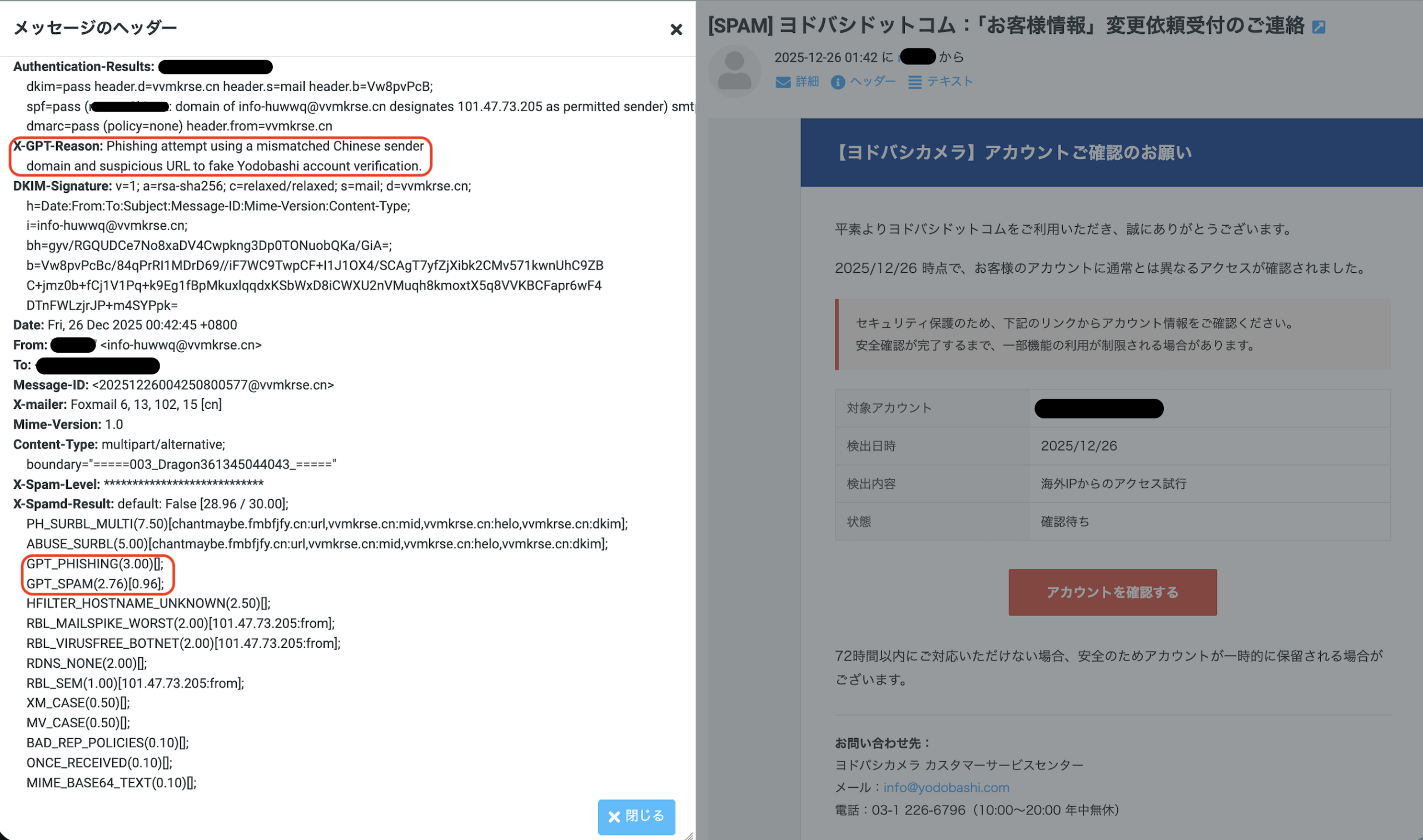
X-GPT-Reason に判定理由
X-Spamd-Result に GPT_PHISHING や GPT_SPAM、GPT_HAMなどが追加される。

結果

集計対象メール数: 2,485 通
GPTの判定平均時間: 1.66 秒 (最長で3秒程度)
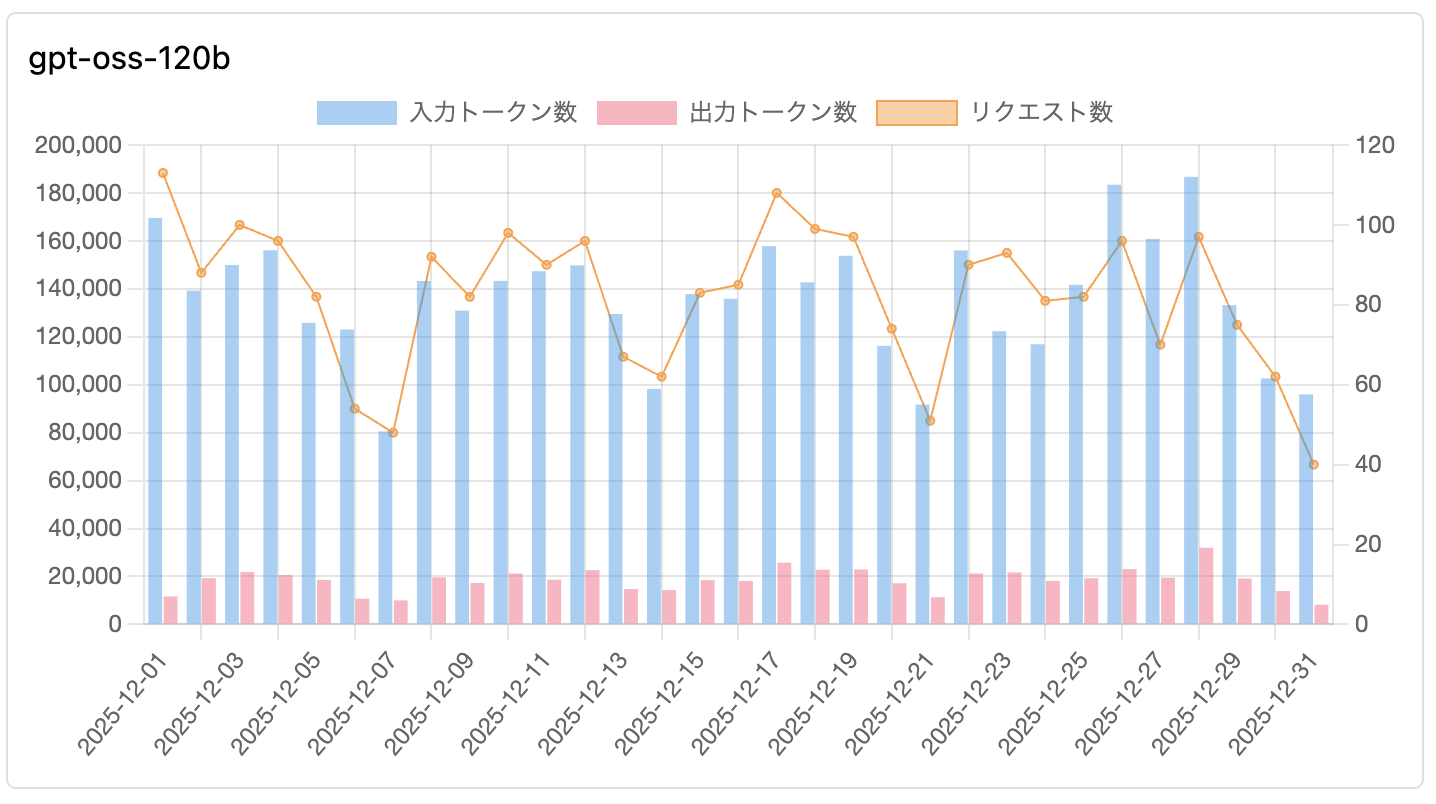

さくらのAI Engine の利用グラフ

1. 【HAM(正常)】判定に多い理由

英文の理由 (Actual Reason) 日本語訳
Legitimate technical mailing list discussion with no suspicious links or requests, indicating ham. 不審なリンクや要求を含まない、正当な技術系メーリングリストの議論であるため、HAM(正常)と判断。
The email is a legitimate automated TLS report from example.com with no suspicious content. example.com からの正当な自動生成TLSレポートであり、不審なコンテンツは含まれていない。
Legitimate job recruitment notification from a known domain (example.com) with matching sender info. 既知のドメイン(example.com)からの正当な求人通知であり、送信者情報も一致している。
Likely ham: a legitimate technical mailing list reply with matching domain and benign URLs. 正常な可能性が高い:ドメインが一致しており、無害なURLを含む正当な技術メーリングリストへの返信である。

2. 【GPT_PHISHING(フィッシング)】判定に多い理由

英文の理由 (Actual Reason) 日本語訳
The email pretends to be from Amazon but originates from an unrelated domain (example.com) and uses suspicious links. Amazonを装っているが、無関係なドメイン(example.com)から送信されており、不審なリンクを使用している。
Suspicious request for account update or login using an external URL (example.com/path) that is not the official domain. 公式ドメインではない外部URL(example.com/path)を使用して、アカウント更新やログインを促す不審な要求。
Uses urgency and suspicious links (example.com) to solicit personal information, typical of phishing scams. フィッシング詐欺に典型的な、緊急性の強調と不審なリンク(example.com)を用いた個人情報の搾取。
Matches credential harvesting patterns by directing to a non-official login page for site administration. サイト管理用の非公式なログインページへ誘導しており、認証情報搾取(クレデンシャル・ハーベスティング)のパターンに一致する。

3. 【GPT_SPAM(スパム)】判定に多い理由

英文の理由 (Actual Reason) 日本語訳
High spam probability due to excessive promotional language, marketing keywords, and unsolicited recruitment. 過度な宣伝文句、マーケティングキーワード、および未承諾の求人勧誘が含まれるため、スパムの可能性が高い。
Primarily promotional content with multiple marketing links and emphasis on discounts or offers. 主にプロモーション内容であり、多数のマーケティング用リンクや、割引・特典の強調が見られる。
Frequent use of marketing phrases and a clear intent to drive traffic to a commercial service. マーケティング用語が頻繁に使用されており、商業サービスへ誘導しようとする明確な意図がある。

GPT_PHISHING がついたもので迷惑メールと判定されたくないものが数通あった。

注意

テストしていたrspamdバージョン(3.13.0)と最新のバージョンでプロンプトが大幅に改善されていることに気づいたので、バージョンアップ(3.14.2)をしてしばらくまた様子をみたい。

rspamd 3.13.0

  settings.prompt = "Analyze this email strictly as a spam detector given the email message, subject, " ..
      "FROM and url domains. Evaluate spam probability (0-1). " ..
      "Output ONLY 3 lines:\n" ..
      "1. Numeric score (0.00-1.00)\n" ..
      "2. One-sentence reason citing whether it is spam, the strongest red flag, or why it is ham\n" ..
      "3. Empty line or mention ONLY the primary concern category if found from the list: " ..
        table.concat(lua_util.keys(categories_map), ', ')

rspamd 3.14.2

  settings.prompt = "Analyze this email as a spam detector. Evaluate spam probability (0-1).\n\n" ..
      "LEGITIMATE patterns to recognize:\n" ..
      "- Verification emails with time-limited codes are NORMAL and legitimate\n" ..
      "- Transactional emails (receipts, confirmations, password resets) from services\n" ..
      "- 'Verify email' or 'confirmation code' is NOT automatically phishing\n" ..
      "- Emails from frequent/known senders (see context) are more trustworthy\n\n" ..
      "Flag as SPAM/PHISHING only with MULTIPLE red flags:\n" ..
      "- Urgent threats or fear tactics (account closure, legal action)\n" ..
      "- Domain impersonation or suspicious lookalikes\n" ..
      "- Requests for passwords, SSN, credit card numbers\n" ..
      "- Mismatched URLs pointing to different domains than sender\n" ..
      "- Poor grammar/spelling in supposedly professional emails\n\n" ..
      "IMPORTANT: If sender is 'frequent' or 'known', reduce phishing probability " ..
      "unless there are strong contradictory signals.\n\n" ..
      "Output ONLY 3 lines:\n" ..
      "1. Numeric score (0.00-1.00)\n" ..
      "2. One-sentence reason citing the strongest indicator\n" ..
      "3. Primary category if applicable: " ..
      table.concat(lua_util.keys(categories_map), ', ')

CentOS8 セットアップメモ[さくらのVPS/CentOS8]

さくらのVPSにCentOS-8-x86_64-1905-dvd1.iso で minimal インストールした後にメールサーバを構築するための自分用のメモ。

・ネットワーク設定

#-- IPとDNS設定
IPV4_ADDR=X.X.X.X
IPV4_SUBNET=23
IPV4_GATEWAY=X.X.X.X
IPV4_DNS=8.8.8.8
IPV6_ADDR=X:X:X:X:X:X:X:X
IPV6_SUBNET=64
IPV6_GATEWAY=fe80::1
IPV6_DNS=2001:e42::1

#-- ipv4 の設定
nmcli connection modify ens3 connection.autoconnect yes ipv4.address ${IPV4_ADDR}/${IPV4_SUBNET} ipv4.gateway ${IPV4_GATEWAY} ipv4.method manual ipv4.dns ${IPV4_DNS}

#-- ipv6 の設定
nmcli connection modify ens3 ipv6.address ${IPV6_ADDR}/${IPV6_SUBNET} ipv6.gateway ${IPV6_GATEWAY} ipv6.method manual ipv6.dns ${IPV6_DNS}

#-- 設定反映
(nmcli c down ens3; nmcli c up ens3)

#-- dnfのwarning 抑制
LANG=C export LANG

#-- 必要なものをインストール epel-release
dnf install -y bash-completion telnet bind-utils git tar epel-release

#-- selinux 無効化
sed -i 's/SELINUX=enforcing/SELINUX=disabled/' /etc/selinux/config
setenforce 0

・rspamd のインストール (dnf でまだインストールできない)

#-- rspamd
mkdir -p ~/work/git && cd ~/work/git
dnf install -y cmake gcc gcc-c++ make autoconf automake libtool
dnf install -y {luajit,sqlite,openssl,libevent,glib2,libicu,libsodium}-devel

curl -O http://www.colm.net/files/colm/colm-0.13.0.7.tar.gz
tar xvzf colm-0.13.0.7.tar.gz
cd colm-0.13.0.7/
./configure
make
make install

curl -O http://www.colm.net/files/ragel/ragel-7.0.0.12.tar.gz
tar xvzf ragel-7.0.0.12.tar.gz
cd ragel-7.0.0.12
./configure
make
make install

git clone --recursive https://github.com/vstakhov/rspamd.git
mkdir rspamd.build && cd rspamd.build
cmake ../rspamd
make
make install

cat <<'_EOF_'>> /usr/lib/systemd/system/rspamd.service
[Unit]
Description=rapid spam filtering system
After=nss-lookup.target network-online.target
Documentation=https://rspamd.com/doc/

[Service]
LimitNOFILE=1048576
NonBlocking=true
ExecStart=/usr/local/bin/rspamd -c /etc/rspamd/rspamd.conf -f
ExecReload=/bin/kill -HUP $MAINPID
User=_rspamd
RuntimeDirectory=rspamd
RuntimeDirectoryMode=0755
Restart=always

[Install]
WantedBy=multi-user.target
_EOF_

ln -s /usr/local/etc/rspamd /etc/rspamd

#-- userid,gid,home,shell は手動で設定したほうがいい
useradd _rspamd

#-- ここで設定とかする

mkdir /var/log/rspamd && chown _rspamd. /var/log/rspamd
systemctl enable rspamd
systemctl start rspamd

・roundcube のインストールメモ

#-- roundcube のインストール
cd ~/work/git
git clone https://github.com/roundcube/roundcubemail.git
cd ~/work/git/roundcubemail
VERSION=$(git for-each-ref --sort=-taggerdate --format='%(tag)' refs/tags | grep -m 1 "1\.4-")
git checkout ${VERSION}
HTTPS_DOCROOT=/var/www/html/https_root
cp -pr ../roundcubemail ${HTTPS_DOCROOT}/roundcubemail-${VERSION}
ln -s ${HTTPS_DOCROOT}/roundcubemail-${VERSION} ${HTTPS_DOCROOT}/roundcube

#-- roundcube の DB を作成
mysql -e "create database roundcubemail character set utf8 collate utf8_bin;"
#-- database の password は お好みで
mysql -e "create user roundcube@localhost identified by 'roundcube';"
mysql -e "grant all privileges ON roundcube.* TO roundcube@localhost ;"
mysql -e "flush privileges;"
mysql roundcubemail < ${HTTPS_DOCROOT}/roundcube/SQL/mysql.initial.sql

yum install -y php-{pdo,xml,pear,mbstring,intl,gd,mysqlnd,ldap,json,pecl-zip} 
dnf install -y php-pear-Auth-SASL php-pear-Net-SMTP
pear install Net_IDNA2-0.2.0
pear install Mail_Mime-1.10.3

#-- ここで設定とかする

dnf install -y npm
npm install -g less

#-- php は 7.2.11, mysql は 8.0.13

他のアプリケーションは dnf でインストールできるのでCentOS7の手順で問題ないはず

OpenLDAPのミラーモード[さくらのVPS/CentOS7]

OpenLDAPのミラーモードを2台のサーバで構築する手順。2台のOpenLDAPサーバに同時に更新を行うと問題が発生する場合がある為、keepalived で VIPを使用できるように設定する。セットアップは 1台目と2台目のサーバで全く同じコマンドを実行する。

・環境

Network InterfaceIPアドレス
1台目:eth1192.168.0.11/24
2台目:eth1192.168.0.12/24
VIP192.168.0.10/24

1. firewalld のセットアップ

#-- eth1 への IPアドレスは事前に設定してあること
#-- eth1 への通信を許可
firewall-cmd --add-interface=eth1 --permanent --zone=trusted 
firewall-cmd --reload

2. keepalived のセットアップ

#-- keepalived のインストール
yum install -y keepalived
systemctl enable keepalived

#-- VIPの設定
cat <<_EOF_> /etc/keepalived/keepalived.conf
vrrp_sync_group VG1 {
  group {
    SERVICE
  }
}

vrrp_instance SERVICE {
  state BACKUP
  interface eth1
  virtual_router_id 1
  priority 100
  advert_int 5
  virtual_ipaddress {
    192.168.0.10
  }
}
_EOF_

#-- keepalived の起動
systemctl start keepalived

#-- これで VIP がどちらかのサーバに設定される

3. openldap のセットアップ

#-- rsyslog に slapd のログ出力設定を追加
echo "local4.*  /var/log/openldaplog" > /etc/rsyslog.d/openldap.conf
sed -i '1s#^#/var/log/openldaplog\n#' /etc/logrotate.d/syslog
systemctl restart rsyslog

#-- パスワードを変数にセット
ROOT_PASSWORD="YourPassword"
ROOT_PW=$(slappasswd -s ${ROOT_PASSWORD})

#-- openldap のインストール (sendmail.schema が必要ない場合、sendmail-cf はインストールしない)
yum install -y openldap-servers openldap-clients sendmail-cf

#-- sendmail schema を保存
cp -p /usr/share/sendmail-cf/sendmail.schema /etc/openldap/schema/

#-- slapd.conf を作成 (schemaは、ミラーモードに 必要なもの + sendmail.schema のみ有効) 
cat <<_EOL_> /etc/openldap/slapd.conf
loglevel 256
sizelimit -1
#include  /etc/openldap/schema/corba.schema
#include  /etc/openldap/schema/duaconf.schema
#include  /etc/openldap/schema/java.schema
#include  /etc/openldap/schema/nis.schema
#include  /etc/openldap/schema/ppolicy.schema
#include  /etc/openldap/schema/collective.schema
include  /etc/openldap/schema/core.schema
include  /etc/openldap/schema/cosine.schema
include  /etc/openldap/schema/dyngroup.schema
include  /etc/openldap/schema/inetorgperson.schema
include  /etc/openldap/schema/misc.schema
include  /etc/openldap/schema/openldap.schema
include  /etc/openldap/schema/sendmail.schema
allow bind_v2
pidfile  /var/run/openldap/slapd.pid
argsfile /var/run/openldap/slapd.args
moduleload syncprov.la
moduleload back_hdb.la
backend hdb
#-- config 用データベースに対するアクセス制限
database config
rootdn  "cn=config"
rootpw  "${ROOT_PW}"
access to * by dn.base="gidNumber=0+uidNumber=0,cn=peercred,cn=external,cn=auth" manage
    by dn="cn=manager" manage
    by * none
overlay syncprov
#-- monitor データベースに対するアクセス制限
#   ROOT_DN のみ read 可能
#   確認コマンド ldapsearch -x -D "cn=config" -W +
database monitor
access to *
    by dn.base="gidNumber=0+uidNumber=0,cn=peercred,cn=external,cn=auth" read
    by * none
#-- user データベース
database hdb
suffix  ""
rootdn  "cn=manager"
rootpw  "${ROOT_PW}"
#--- userPassword に対するアクセス制限
#   自分自身は書き換え可能
#   ROOT_DN は書き換え可能
#   匿名接続ならば、認証したときにこの属性が使える
access to attrs=UserPassword
    by self write
    by anonymous auth
    by * none
#-- Termed は ROOT_DN のみ書き換え可能
access to dn.regex="uid=.*,ou=Termed,dc=.*"
    by * none
#-- その他の属性は ROOT_DN のみ書き換え可能
#   ROOT_DN 以外は read のみ可能
access to *
    by dn.base="gidNumber=0+uidNumber=0,cn=peercred,cn=external,cn=auth" manage
    by * read
checkpoint 1024 15
directory /var/lib/ldap
index entryCSN,entryUUID eq
index objectClass   eq,pres
index uid           eq,pres,sub
index mailHost,mailRoutingAddress,mailLocalAddress,sendmailMTAHost eq,pres
overlay syncprov
_EOL_

#-- slapd.conf から olc に設定を変換する為の前処理
rm -rf /etc/openldap/slapd.d/* /var/lib/ldap/*
mv /etc/openldap/slapd.d /etc/openldap/slapd.d.org

#-- DB_CONFIGの設定
# cp /usr/share/openldap-servers/DB_CONFIG.example /var/lib/ldap/DB_CONFIG
cat <<'_EOL_'> /var/lib/ldap/DB_CONFIG
set_cachesize 0 10485760 1
set_flags DB_LOG_AUTOREMOVE
set_lg_regionmax 262144
set_lg_bsize 2097152
_EOL_

#-- DBの初期化など
systemctl start slapd
systemctl stop slapd
mv /etc/openldap/slapd.d.org /etc/openldap/slapd.d

#-- slapd.conf から olc に設定を変換
sudo -u ldap slaptest -f /etc/openldap/slapd.conf -F /etc/openldap/slapd.d

#-- slapd の起動
systemctl enable slapd
systemctl start slapd

#-- ミラーモードの ldif 作成
cat <<_EOL_> /tmp/ldap_mirror.ldif
dn: cn=config
changetype: modify
add: olcServerID
olcServerID: 001 ldap://192.168.0.11
-
add: olcServerID
olcServerID: 002 ldap://192.168.0.12

dn: olcDatabase={2}hdb,cn=config
changetype: modify
add: olcSyncRepl
olcSyncRepl: rid=001 provider=ldap://192.168.0.12/ binddn="cn=manager" bindmethod=simple credentials=${ROOT_PASSWORD} searchbase="" type=refreshAndPersist retry="5 10 60 +" timeout=1 scope=sub starttls=no schemachecking=ok
olcSyncRepl: rid=002 provider=ldap://192.168.0.11/ binddn="cn=manager" bindmethod=simple credentials=${ROOT_PASSWORD} searchbase="" type=refreshAndPersist retry="5 10 60 +" timeout=1 scope=sub starttls=no schemachecking=ok
-
add: olcMirrorMode
olcMirrorMode: TRUE

dn: olcDatabase={0}config,cn=config
changetype: modify
add: olcSyncRepl
olcSyncRepl: rid=001 provider=ldap://192.168.0.12/ binddn="cn=config" bindmethod=simple credentials=${ROOT_PASSWORD} searchbase="cn=config" type=refreshAndPersist retry="5 10 300 +" timeout=1
olcSyncRepl: rid=002 provider=ldap://192.168.0.11/ binddn="cn=config" bindmethod=simple credentials=${ROOT_PASSWORD} searchbase="cn=config" type=refreshAndPersist retry="5 10 300 +" timeout=1
-
add: olcMirrorMode
olcMirrorMode: TRUE
_EOL_

#-- ミラーモードの設定投入
ldapadd -D "cn=config" -w ${ROOT_PASSWORD} -f /tmp/ldap_mirror.ldif

# これで VIP に対して更新処理を行えば、もう一方のサーバにも更新内容が反映される

roundcube を 1.3.8 から 1.4-rc1 へバージョンアップする

#-- 変数の設定
DOMAIN=masdon.life
HTTPS_DOCROOT=/var/www/html/https_root

cd /root/work/git/roundcubemail

#-- git pull で更新
git pull
VERSION=1.4-rc1
git checkout ${VERSION}
cp -pr ../roundcubemail ${HTTPS_DOCROOT}/roundcubemail-${VERSION}
ln -s ${HTTPS_DOCROOT}/roundcubemail-${VERSION} ${HTTPS_DOCROOT}/roundcube

#-- 設定

cat <<'_EOF_'> ${HTTPS_DOCROOT}/roundcube/config/config.inc.php
<?php
$config['db_dsnw'] = 'mysql://roundcube:roundcube@localhost/roundcubemail';
$config['default_host'] = array('_DOMAIN_');
$config['default_port'] = 993;
$config['smtp_server'] = '_DOMAIN_';
$config['smtp_port'] = 465;
$config['smtp_user'] = '%u';
$config['smtp_pass'] = '%p';
$config['support_url'] = '';
$config['product_name'] = 'Roundcube Webmail';
$config['des_key'] = 'rcmail-!24ByteDESkey*Str';
$config['plugins'] = array('managesieve', 'password', 'archive', 'zipdownload');
$config['managesieve_host'] = 'localhost';
$config['spellcheck_engine'] = 'pspell';
$config['skin'] = 'larry';
_EOF_

sed -i "s#_DOMAIN_#ssl://${DOMAIN}#" ${HTTPS_DOCROOT}/roundcube/config/config.inc.php

cp -p ${HTTPS_DOCROOT}/roundcube/plugins/managesieve/config.inc.php{.dist,}
sed -i -e "s/managesieve_vacation'] = 0/managesieve_vacation'] = 1/" ${HTTPS_DOCROOT}/roundcube/plugins/managesieve/config.inc.php

cp -p ${HTTPS_DOCROOT}/roundcube/plugins/password/config.inc.php{.dist,}

sed -i -e "s/'sql'/'ldap'/" \
       -e "s/'ou=people,dc=example,dc=com'/''/" \
       -e "s/'dc=exemple,dc=com'/''/" \
       -e "s/'uid=%login,ou=people,dc=exemple,dc=com'/'uid=%name,ou=People,%dc'/" \
       -e "s/'(uid=%login)'/'(uid=%name,ou=People,%dc)'/" ${HTTPS_DOCROOT}/roundcube/plugins/password/config.inc.php

chown -R nginx. ${HTTPS_DOCROOT}/roundcubemail-${VERSION}
cd ${HTTPS_DOCROOT}/roundcube/bin
./install-jsdeps.sh

#-- database などの update (./update.sh の参照している php が module をインストールした php のバージョンと一致していること)
./update.sh
What version are you upgrading from? Type '?' if you don't know.
1.3.8
WARNING: Dependency check failed!
(Some of your configuration settings require other options to be configured or additional PHP modules to be installed)
- spellcheck_engine: This requires the <tt>pspell</tt> extension which could not be loaded.
Please fix your config files and run this script again!
See ya.
Executing database schema update.
Updating database schema (2018021600)... [OK]
Updating database schema (2018122300)... [OK]
This instance of Roundcube is up-to-date.
Have fun!

mv ${HTTPS_DOCROOT}/roundcube/installer ${HTTPS_DOCROOT}/roundcube/_installer

#-- elastic テーマを使用するため、lessc コマンドをインストール
yum install -y npm
npm install -g less

cd ${HTTPS_DOCROOT}/roundcube/skins/elastic
lessc -x styles/styles.less > styles/styles.css
lessc -x styles/print.less > styles/print.css
lessc -x styles/embed.less > styles/embed.css

28. さくらのレンタルサーバをマウントする – curlftpfs [さくらのVPS/CentOS7]

  • さくらのレンタルサーバ スタンダードプラン の 100GB ディスクをさくらのVPS でマウントして使用する
#-- 変数に値を代入
DOMAIN=example.sakura.ne.jp #-- レンタルサーバのドメイン
USER=foo #-- レンタルサーバのログインID
PASS=bar #-- レンタルサーバのパスワード

#-- curlftpfs のインストール
yum install -y curlftpfs

#-- mount ポイントの作成
mkdir -p /mnt/ftpfs

#-- ログイン情報ファイルを作成
cat  <<_EOL_> ~/.netrc
machine ${DOMAIN} login ${USER} password ${PASS}
_EOL_

#-- mount コマンドでマウントできるように fstab に記述
cat <<_EOL_>> /etc/fstab
curlftpfs#${DOMAIN} /mnt/ftpfs fuse noauto,user,rw,uid=0,allow_other 0 0
_EOL_
#- auto マウントを設定すると 再起動時にブートに失敗する

#-- マウント
mount /mnt/ftpfs

#-- 確認
df -h /mnt/ftpfs
Filesystem                           Size  Used Avail Use% Mounted on
curlftpfs#ftp://example.sakura.ne.jp/  954G     0  954G   0% /mnt/ftpfs

dovecot で public mailbox を使用する

#-- 変数に必要な値を代入
DOMAIN=masdon.life

#-- /etc/dovecot/local.conf に設定を追加する
vi /etc/dovecot/local.conf

#- mail_plugins に acl を追加
mail_plugins = $mail_plugins zlib acl

#- plugin に acl = vfile を追加
plugin {
  ...
  ...
  acl = vfile
}

#- protocol imap の mail_plugins に imap_acl を追加
protocol imap {
  mail_plugins = $mail_plugins imap_acl
  ...
}

#- namespace の設定を追加
namespace inbox {
  type = private
  separator = /
  prefix =
  inbox = yes
}

#- _Public/Test01 と _Public/Test02 を作成する
namespace {
  type = public
  separator = /
  prefix = _Public/
  location = maildir:/var/dovecot/public/%Ld
  subscriptions = yes
  list = yes
  mailbox Test01 {
    auto = subscribe
  }
  mailbox Test02 {
    auto = subscribe
  }
}

#-- dovecot を reload
systemctl reload dovecot

#-- _Public を該当ドメイン全てのユーザで使用できるよう acl を設定
echo "anyone eilprwts" > /var/dovecot/public/${DOMAIN}/dovecot-acl
chown dovecot. /var/dovecot/public/${DOMAIN}/dovecot-acl
chmod 600 /var/dovecot/public/${DOMAIN}/dovecot-acl

#-- 該当ドメインのメールアカウントを設定したメーラーで _Public/Test01と_Public/Test02 フォルダを購読しアクセスすると MBOXが作成される
#-- 作成されたMBOXは、上位フォルダの ACL が設定される
ls -ld /var/dovecot/public/${DOMAIN}/.Test0{1,2}
drwx------ 5 dovecot dovecot 146  2月 17 21:45 /var/dovecot/public/masdon.life/.Test01
drwx------ 5 dovecot dovecot 146  2月 17 21:09 /var/dovecot/public/masdon.life/.Test02

#-- _Public/Test01 を該当ドメイン全てのユーザで使用できるよう acl を設定
echo "anyone eilprwts" > /var/dovecot/public/${DOMAIN}/.Test01/dovecot-acl
chown dovecot. /var/dovecot/public/${DOMAIN}/.Test01/dovecot-acl
chmod 600 /var/dovecot/public/${DOMAIN}/.Test01/dovecot-acl

#-- _Public/Test02 をadminユーザのみで使用できるよう acl を設定
echo "user=admin@${DOMAIN} eilprwts" > /var/dovecot/public/${DOMAIN}/.Test02/dovecot-acl
chown dovecot. /var/dovecot/public/${DOMAIN}/.Test02/dovecot-acl
chmod 600 /var/dovecot/public/${DOMAIN}/.Test02/dovecot-acl

#-- _Public/Test02 にコマンドで acl に特定のユーザの権限を追加
doveadm acl add -u admin@${DOMAIN} _Public/Test02 user=ma3ki@${DOMAIN} expunge insert lookup post read write write-deleted write-seen

#-- _Public/Test02 にコマンドで acl に gr1 というグループの権限を追加
doveadm acl add -u admin@${DOMAIN} _Public/Test02 group=gr1 expunge insert lookup post read write write-deleted write-seen

#-- 権限の確認
doveadm acl get -u admin@${DOMAIN} _Public/Test01
ID     Global Rights
anyone        expunge insert lookup post read write write-deleted write-seen

doveadm acl get -u admin@${DOMAIN} _Public/Test02
ID                        Global Rights
user=admin@masdon.life        expunge insert lookup post read write write-deleted write-seen
user=ma3ki@masdon.life        expunge insert lookup post read write write-deleted write-seen

#-- ACL のフラグの意味 https://doc.dovecot.org/settings/plugin/acl/

27. メーリングリストサーバ構築 – sympa [さくらのVPS/CentOS7]

・ 構築の前に

  1. メールサーバの構築が 11. メールサーバ構築(5) – nginx/php-fpm [さくらのVPS/CentOS7]
    まで完了していること
  2. メーリングリスト用にサブドメインを一つ用意すること
  3. メーリングリストから送信されるシステムメールは SPF, DKIM, DMARC, ARC に対応
  4. メーリングリストから送信される投稿メールは SPF,ARC に対応し、DKIM, DMARCは自メールドメインからの投稿メールのみ対応する

・sympa のインストール

#-- 変数に必要な値を代入
DOMAIN=masdon.life
MLDOMAIN=ml.${DOMAIN}
LISTMASTER=admin@${DOMAIN}
URL=https://${DOMAIN}/sympa

#-- sympa のリポジトリ設定とsympaのインストール(副作用でnginxもインストールされてしまう)
curl -o /etc/yum.repos.d/sympa-ja.org.rhel.repo http://sympa-ja.org/download/rhel/sympa-ja.org.rhel.repo
yum install -y sympa sympa-nginx

#-- nginx の起動スクリプトの修正
sed -i -e 's#/usr/sbin/nginx#/usr/local/nginx/sbin/nginx#' \
       -e '/^PIDFile/a ExecStartPre=/usr/local/bin/ipv6upchk.sh nginx' /usr/lib/systemd/system/nginx.service

systemctl daemon-reload
systemctl enable nginx

#-- nginx と sympa-nginx を update しないように変更
echo "exclude=nginx*,sympa-nginx" >> /etc/yum.conf

#-- sympa の database を作成
mysql -e "CREATE DATABASE sympa CHARACTER SET utf8;"
#-- database の password は お好みで
mysql -e "GRANT ALL PRIVILEGES ON sympa.* TO 'sympa'@'localhost' IDENTIFIED BY 'sympass';"
mysql -e "FLUSH PRIVILEGES;"

#-- sympa の設定
cp -p /etc/sympa/sympa.conf{,.org}

sed -i -e "/^#domain/a domain ${MLDOMAIN}" \
       -e "/^#listmaster/a listmaster ${LISTMASTER}" \
       -e "/^#lang/a lang ja" \
       -e "/^#db_type/a db_type MySQL" \
       -e "/^#db_name/a db_name sympa" \
       -e "/^#db_host/a db_host 127.0.0.1" \
       -e "/^#db_user/a db_user sympa" \
       -e "/^#db_passwd/a db_passwd sympass" \
       -e "/^#wwsympa_url/a wwsympa_url ${URL}" /etc/sympa/sympa.conf

#- sympa の設定の確認(何も表示されなければOK)
sympa.pl --health_check

#- 定期的に postfix の設定を更新するスクリプトを作成
cat <<'_EOL_'> /usr/local/bin/create_sympa_regex.sh
#!/bin/bash

if [ $# -ne 1 ]
then
  echo "usage: $0 <sympa-domain>"
  exit 1
fi

DOMAIN=$1
SYMPA1=/etc/sympa/aliases.sympa.postfix
SYMPA2=/var/lib/sympa/sympa_aliases
REGEX=/etc/postfix-inbound/symparcptcheck.regexp
TMP=/tmp/symparcptcheck.regexp

# 2分以内にメーリングリストの更新があったらpostfixに反映する
LIMIT=120

if [ $(($(stat --format=%Y ${SYMPA1}) + ${LIMIT})) -ge $(date +%s) ] || [ $(($(stat --format=%Y ${SYMPA2}) + ${LIMIT})) -ge $(date +%s) ]
then
  /usr/bin/cp /dev/null ${TMP}
  for x in $(awk -F: '!/^#/{print $1}' ${SYMPA1} ${SYMPA2})
  do
      echo "/^${x}@${DOMAIN}/ OK" >> ${TMP}
  done
  /usr/bin/mv -f ${TMP} ${REGEX}
  systemctl reload postfix
fi

exit 0
_EOL_

chmod 755 /usr/local/bin/create_sympa_regex.sh

#- alias 関連ファイルのパーミション設定やデータ更新
chown sympa /etc/sympa/aliases.sympa.postfix.db
chown sympa /var/lib/sympa
postalias /var/lib/sympa/sympa_aliases

sed -i -e "s/\S*@my.domain.org/admin@${DOMAIN}/" -e "s/postmaster/admin@${DOMAIN}/" /etc/sympa/aliases.sympa.postfix
postalias /etc/sympa/aliases.sympa.postfix

#- postfix 用の宛先存在確認ルールを作成(上記コマンド実行後、2分以内に実行すること)
/usr/local/bin/create_sympa_regex.sh ${MLDOMAIN}

#- sympaでメーリングリストが追加された場合にpostfixに設定を反映するためのcron
echo "* * * * * root /usr/local/bin/create_sympa_regex.sh ${MLDOMAIN} >/dev/null 2>&1" >> /etc/cron.d/${DOMAIN}-cron

#-- nginx に設定追加
rm -f /etc/nginx/conf.d/sympa.conf
cat <<'_EOL_'> /etc/nginx/conf.d/https.d/sympa.conf
    location /sympa {
        include       /etc/nginx/fastcgi_params;
        fastcgi_pass  unix:/var/run/sympa/wwsympa.socket;

        # If you changed wwsympa_url in sympa.conf, change this regex too!
        fastcgi_split_path_info ^(/sympa)(.*)$;
        fastcgi_param SCRIPT_FILENAME /usr/libexec/sympa/wwsympa.fcgi;
        fastcgi_param PATH_INFO $fastcgi_path_info;

    }

    location /static-sympa/css {
        alias /var/lib/sympa/css;
    }
    location /static-sympa/pictures {
        alias /var/lib/sympa/pictures;
    }
    location /static-sympa {
        alias /usr/share/sympa/static_content;
    }
_EOL_

systemctl restart nginx

#-- sympa 起動
systemctl enable sympa wwsympa
systemctl start sympa wwsympa

#-- postfix の設定
#- メールを受け付ける対象にml用ドメインを追加
cat <<_EOF_>> /etc/postfix-inbound/relay_domains
${MLDOMAIN}
_EOF_

#- ml用ドメインはローカルに配送する(alias を適用する)設定を追加
cat <<_EOF_>> /etc/postfix-inbound/transport
${MLDOMAIN} local:
_EOF_

postmap /etc/postfix-inbound/transport

#- alias を sympa のファイルを参照するように変更、宛先チェックなどの設定も変更
postconf -c /etc/postfix-inbound -e alias_maps=hash:/etc/sympa/aliases.sympa.postfix,hash:/var/lib/sympa/sympa_aliases
postconf -c /etc/postfix-inbound -e alias_database=/etc/sympa/aliases.sympa.postfix,hash:/var/lib/sympa/sympa_aliases
postconf -c /etc/postfix-inbound -e smtpd_recipient_restrictions="check_recipient_access ldap:/etc/postfix-inbound/ldaprcptcheck.cf check_recipient_access regexp:/etc/postfix-inbound/symparcptcheck.regexp reject"
postconf -c /etc/postfix-inbound -e transport_maps="ldap:/etc/postfix-inbound/ldaptransport.cf hash:/etc/postfix-inbound/transport"

systemctl restart postfix

#-- rspamd の設定

#- envelope from が ml用ドメインの場合、SPAM判定のScoreを10下げる(これを実施しないと送信時にX-Spam: Yes が追加される)
cat <<_EOF_> /etc/rspamd/local.d/multimap.conf
WHITELIST_SENDER_DOMAIN {
  type = "from";
  filter = "email:domain";
  map = "/etc/rspamd/local.d/whitelist_sender_domain.map";
  score = -10.0
}
_EOF_

cat <<_EOF_>/etc/rspamd/local.d/whitelist_sender_domain.map
${MLDOMAIN}
_EOF_

#- DKIM と ARC の署名設定を追加する(詳しくはrspamdの構築設定手順を参照)
rspamadm dkim_keygen -d ${MLDOMAIN} -s default -b 2048
#-- 秘密鍵を記述
vi /etc/rspamd/local.d/keys/default.${MLDOMAIN}.key
chmod 600 /etc/rspamd/local.d/keys/default.${MLDOMAIN}.key
chown _rspamd. /etc/rspamd/local.d/keys/default.${MLDOMAIN}.key

#- ml用ドメインの設定を追加する
vi /etc/rspamd/local.d/dkim_signing.conf
vi /etc/rspamd/local.d/arc.conf

#- dkim署名するヘッダーを下記に変更する
vi /etc/rspamd/local.d/dkim_signing.conf
sign_headers = '(o)from:(o)date:(o)message-id:(o)to:(o)cc:(o)mime-version:(o)content-type:(o)content-transfer-encoding:resent-to:resent-cc:resent-from:resent-sender:resent-message-id:(o)in-reply-to:(o)references:list-id:list-owner:list-unsubscribe:list-subscribe:list-post';

#- arc署名するヘッダーを下記に変更する
vi /etc/rspamd/local.d/arc.conf
sign_headers = "(o)from:(o)sender:(o)reply-to:(o)date:(o)message-id:(o)to:(o)cc:(o)mime-version:(o)content-type:(o)content-transfer-encoding:resent-to:resent-cc:resent-from:resent-sender:resent-message-id:(o)in-reply-to:(o)references:list-id:list-owner:list-unsubscribe:list-subscribe:list-post:dkim-signature";

#- rspamd 再起動
systemctl restart rspamd

#-- nsd の設定
IPV4=$(ip addr show eth0 | awk '/inet /{print $2}' | awk -F\/ '{print $1}')
IPV6=$(ip addr show eth0 | awk '/inet6 /&&/global/{print $2}' | awk -F\/ '{print $1}')

cat <<_EOL_>>/etc/nsd/zone/${DOMAIN}.zone
ml                      IN      MX 100  ${DOMAIN}.
ml                      IN      TXT     "v=spf1 +ip4:${IPV4} +ip6:${IPV6} -all"
_dmarc.ml               IN      TXT     "v=DMARC1; p=none; rua=mailto:root@${DOMAIN}"
_adsp._domainkey.ml     IN      TXT     "dkim=discardable"
default._domainkey.ml   IN      TXT     ( "v=DKIM1; k=rsa; "
                                        "p=共通鍵を記述"
                                        ) ;
_EOL_

systemctl restart nsd

・初期パスワードの作成

  • https://masdon.life/sympa/firstpasswd で 管理者ユーザのパスワードを作成する

26. Realtime Monitoring – netdata [さくらのVPS/CentOS7]

・ netdata のインストール

#-- 必要なパッケージのインストール
yum install autoconf automake libmnl-devel libuuid-devel libuv-devel lm-sensors MySQL-python nc pkgconfig python-psycopg2 PyYAML

#-- netdata のインストールと起動
cd ~/work/src/
git clone https://github.com/firehol/netdata.git --depth=1
cd netdata/
./netdata-installer.sh --install /opt

systemctl enable netdata
systemctl start netdata

#-- netdata用の nginx の設定追加
cat <<'_EOL_'> /etc/nginx/conf.d/https.d/netdata.conf
  location ^~ /netdata {
    location /netdata/ {
      proxy_pass       http://127.0.0.1:19999/;
      proxy_set_header Host      $host;
      proxy_set_header X-Forwarded-For $proxy_add_x_forwarded_for;
      auth_ldap "Basic Auth Location";
      auth_ldap_servers ldap1;
    }
  }
_EOL_

systemctl restart nginx

25. GitHubクローン構築 – Gogs [さくらのVPS/CentOS7]

・Gogs のインストール

#-- 変数に必要な値を代入
DOMAIN=masdon.life

#-- gogs の database を作成
mysql -e "create database gogs character set utf8 collate utf8_bin;"
#-- database の password は お好みで
mysql -e "grant all on gogs.* to gogs@localhost identified by 'gogspass';"
mysql -e "FLUSH PRIVILEGES;"

#-- gogs 起動ユーザ/グループの作成
groupadd --gid 3000 git
useradd --uid 3000 --gid 3000 --shell /bin/bash git

#-- git アカウントで gogs のインストール
su - git
VERSION=0.11.79
curl -L -O https://dl.gogs.io/${VERSION}/gogs_${VERSION}_linux_amd64.tar.gz
tar xvzf gogs_${VERSION}_linux_amd64.tar.gz
mkdir -p ~/gogs/custom/conf

cat <<_EOL_>~/gogs/custom/conf/app.ini
[server]
ROOT_URL = https://${DOMAIN}/gogs/
HTTP_ADDR = 127.0.0.1
HTTP_PORT = 3000
[database]
DB_TYPE = mysql
HOST = 127.0.0.1:3306
NAME = gogs
USER = gogs
_EOL_

exit

#-- gogs の起動
cp -p /home/git/gogs/scripts/systemd/gogs.service /etc/systemd/system/
systemctl enable gogs
systemctl start gogs

#-- gogs 用の nginx の設定追加
cat <<'_EOL_'> /etc/nginx/conf.d/https.d/gogs.conf
  location ^~ /gogs {
    location /gogs/ {
      proxy_pass       http://127.0.0.1:3000/;
      proxy_set_header Host      $host;
      proxy_set_header X-Forwarded-For $proxy_add_x_forwarded_for;
    }
  }
_EOL_

systemctl restart nginx

https://masdon.life/gogs/ で 初期設定を実施すること

24. Mastodonサーバ構築 [さくらのVPS/CentOS7]

・Mastodon のインストール

Mastodon は サブディレクトリ環境では動作しないため、VirtualHostで対応する

#-- 変数に必要な値を代入
VHOST=mstdn.masdon.life
DOMAIN=masdon.life
#-- admin@masdon.life のパスワード
PASSWORD=********
IPV4=$(ip addr show eth0 | awk '/inet /{print $2}' | awk -F\/ '{print $1}' | head -1)
IPV6=$(ip addr show eth0 | awk '/inet6 /&&/global/{print $2}' | awk -F\/ '{print $1}')

#-- 正引きを追加
cat <<_EOL_>> /etc/nsd/zone/${DOMAIN}.zone
mstdn                   IN      A       ${IPV4}
mstdn                   IN      AAAA    ${IPV6}
_EOL_

#-- シリアル更新
vi /etc/nsd/zone/${ZONE}.zone

systemctl restart nsd

#-- 既存の TLS証明書に mstdn.masdon.life を追加
certbot -n certonly --webroot -w /var/www/html/http_root -d ${DOMAIN} -d ${VHOST} -m admin@${DOMAIN} --agree-tos --expand

systemctl reload postfix nginx

#-- Mastodon インストール
curl -sL https://rpm.nodesource.com/setup_10.x | bash -
yum install -y http://li.nux.ro/download/nux/dextop/el7/x86_64/nux-dextop-release-0-5.el7.nux.noarch.rpm
yum install -y ImageMagick ffmpeg rubygem-redis authd nodejs {openssl,readline,zlib,libxml2,libxslt,protobuf,ffmpeg,libidn,libicu}-devel protobuf-compiler
npm install -g yarn

su - postgres -c "createuser --createdb mastodon"

useradd mastodon
SETUP=/home/mastodon/setup.sh

cat <<_EOL_> ${SETUP}
REPO=https://github.com/sstephenson
git clone \${REPO}/rbenv.git ~/.rbenv
echo 'export PATH="~/.rbenv/bin:/usr/pgsql-11/bin:$PATH"' >> ~/.bash_profile
source ~/.bash_profile
rbenv init - >> ~/.bash_profile
source ~/.bash_profile
git clone \${REPO}/ruby-build.git ~/.rbenv/plugins/ruby-build
git clone https://github.com/tootsuite/mastodon.git live
cd live
git checkout \$(git tag|grep -v rc|tail -1)
cd ..
RV=\$(cat live/.ruby-version)
rbenv install \${RV}
rbenv global \${RV}
rbenv rehash
cd live
#-- エラーとなったのでバージョンを指定
# gem install bundler
gem install bundler 1.17.3
bundle install --deployment --without development test

yarn install --pure-lockfile
cp .env.production{.sample,}
export RAILS_ENV=production SAFETY_ASSURED=1
SKB=\$(bundle exec rake secret)
PS=\$(bundle exec rake secret)
OS=\$(bundle exec rake secret)
sed -i -e "s/_HOST=[rd].*/_HOST=localhost/" \
-e "s/=postgres$/=mastodon/" \
-e "s/^LOCAL_DOMAIN.*/LOCAL_DOMAIN=${VHOST}/" \
-e "s/^LOCAL_HTTPS.*/LOCAL_HTTPS=true/" \
-e "s/^SMTP_SERVER.*/SMTP_SERVER=${DOMAIN}/" \
-e "s/^SMTP_PORT=587/SMTP_PORT=465/" \
-e "s/^SMTP_LOGIN/SMTP_LOGIN=admin@${DOMAIN}/" \
-e "s/^SMTP_PASSWORD/SMTP_PASSWORD=${PASSWORD}/" \
-e "s/^#SMTP_AUTH_METHOD.*/SMTP_AUTH_METHOD=plain/" \
-e "s/^#SMTP_TLS=true/SMTP_TLS=true/" \
-e "s/^SMTP_FROM_ADDRESS.*/SMTP_FROM_ADDRESS=admin@${DOMAIN}/" \
-e "s/^SECRET_KEY_BASE=/SECRET_KEY_BASE=\${SKB}/" \
-e "s/^OTP_SECRET=/OTP_SECRET=\${OS}/" .env.production

export \$(bundle exec rake mastodon:webpush:generate_vapid_key)
sed -i -e "s/^VAPID_PRIVATE_KEY=/VAPID_PRIVATE_KEY=\${VAPID_PRIVATE_KEY}/" \
-e "s/^VAPID_PUBLIC_KEY=/VAPID_PUBLIC_KEY=\${VAPID_PUBLIC_KEY}/" .env.production

bundle exec rails db:setup
bundle exec rails assets:precompile
_EOL_

chmod 755 ${SETUP}
chown mastodon. ${SETUP}
su - mastodon -c "/bin/bash ${SETUP}"

chmod 770 /home/mastodon
usermod -aG mastodon nginx

cp /home/mastodon/live/dist/mastodon-*.service /etc/systemd/system/
systemctl enable mastodon-{web,sidekiq,streaming}
systemctl start mastodon-{web,sidekiq,streaming}

cat <<'_EOL_'>/etc/nginx/conf.d/${VHOST}.conf
map $http_upgrade $connection_upgrade {
  default upgrade;
  ''      close;
}

proxy_cache_path /var/cache/nginx_mastodon levels=1:2 keys_zone=CACHE:10m inactive=7d max_size=1g;

server {
  listen 80;
  listen [::]:80;
  server_name _VHOST_;
  root /home/mastodon/live/public;
  location /.well-known/acme-challenge/ { allow all; }
  location / { return 301 https://$host$request_uri; }
}

server {
  listen 443 ssl http2;
  listen [::]:443 ssl http2;
  server_name _VHOST_;

  include /etc/nginx/default.d/_DOMAIN__ssl.conf;
  access_log /var/log/nginx/_VHOST__access.log main;
  error_log  /var/log/nginx/_VHOST__error.log  error;
  server_tokens off;
  charset     utf-8;

  ssl_session_cache shared:WEB:10m;
  add_header Strict-Transport-Security "max-age=31536000; includeSubDomains" always;
  ssl_stapling on ;
  ssl_stapling_verify on ;

  keepalive_timeout    70;
  sendfile             on;
  client_max_body_size 80m;

  root /home/mastodon/live/public;

  gzip on;
  gzip_disable "msie6";
  gzip_vary on;
  gzip_proxied any;
  gzip_comp_level 6;
  gzip_buffers 16 8k;
  gzip_http_version 1.1;
  gzip_types text/plain text/css application/json application/javascript text/xml application/xml application/xml+rss text/javascript;

  add_header Strict-Transport-Security "max-age=31536000";

  location / {
    try_files $uri @proxy;
  }

  location ~ ^/(emoji|packs|system/accounts/avatars|system/media_attachments/files) {
    add_header Cache-Control "public, max-age=31536000, immutable";
    add_header Strict-Transport-Security "max-age=31536000";
    try_files $uri @proxy;
  }

  location /sw.js {
    add_header Cache-Control "public, max-age=0";
    add_header Strict-Transport-Security "max-age=31536000";
    try_files $uri @proxy;
  }

  location @proxy {
    proxy_set_header Host $host;
    proxy_set_header X-Real-IP $remote_addr;
    proxy_set_header X-Forwarded-For $proxy_add_x_forwarded_for;
    proxy_set_header X-Forwarded-Proto https;
    proxy_set_header Proxy "";
    proxy_pass_header Server;

    proxy_pass http://127.0.0.1:3000;
    proxy_buffering on;
    proxy_redirect off;
    proxy_http_version 1.1;
    proxy_set_header Upgrade $http_upgrade;
    proxy_set_header Connection $connection_upgrade;

    proxy_cache CACHE;
    proxy_cache_valid 200 7d;
    proxy_cache_use_stale error timeout updating http_500 http_502 http_503 http_504;
    add_header X-Cached $upstream_cache_status;
    add_header Strict-Transport-Security "max-age=31536000";

    tcp_nodelay on;
  }

  location /api/v1/streaming {
    proxy_set_header Host $host;
    proxy_set_header X-Real-IP $remote_addr;
    proxy_set_header X-Forwarded-For $proxy_add_x_forwarded_for;
    proxy_set_header X-Forwarded-Proto https;
    proxy_set_header Proxy "";

    proxy_pass http://127.0.0.1:4000;
    proxy_buffering off;
    proxy_redirect off;
    proxy_http_version 1.1;
    proxy_set_header Upgrade $http_upgrade;
    proxy_set_header Connection $connection_upgrade;

    tcp_nodelay on;
  }

  error_page 500 501 502 503 504 /500.html;
}
_EOL_

sed -i -e "s/_DOMAIN_/${DOMAIN}/" \
       -e "s/_VHOST_/${VHOST}/" /etc/nginx/conf.d/${VHOST}.conf

systemctl start nginx